 Discord
 Telegram

Verified buyers only
Only a confirmed buyer can leave a review
 Rob Run
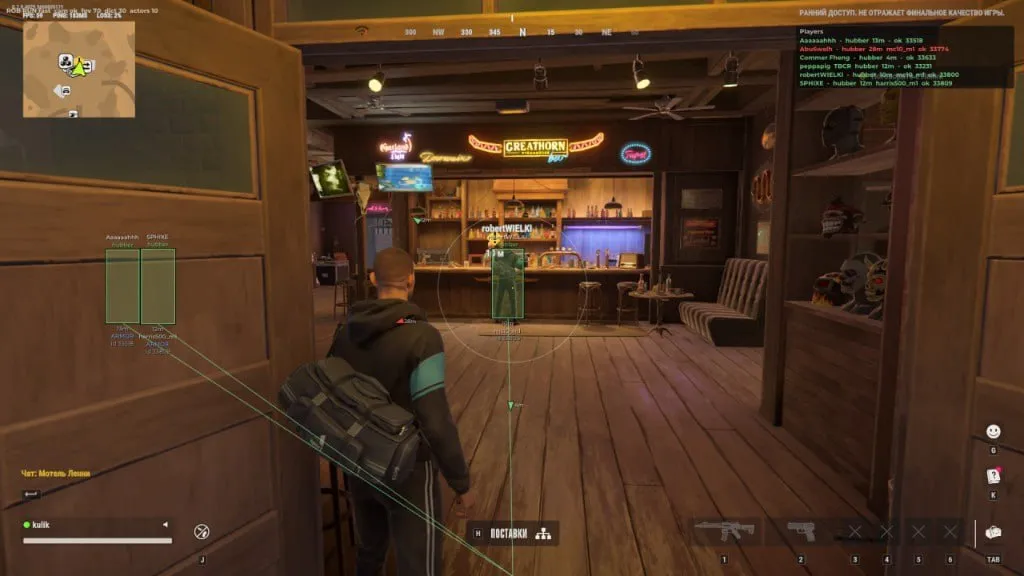
<p>Courier is a Rob Run cheat with configurable aim and player ESP.</p><p>Choose a target bone, then decide whether the crosshair or distance takes priority. Force Key gives you a separate key to hold for head aiming. Smoothing, aim distance and Target delay have their own controls, so you can adjust them individually.</p><p>Build the player overlay around the details you need. Hide dead or knocked players and those in vehicles to leave fewer labels competing for attention. The Player list can be sorted by distance, name or role, with an adjustable row count. Preview reflects the box, fill, skeleton, name and distance options you have enabled.</p><p>Camera FOV supplies a fallback value for the overlay projection when the game's camera FOV cannot be read. It does not change the game's field of view.</p>
Courier for Rob Run separates the players you see from the targets your aimbot can select. You can keep a knocked player visible while excluding them from aim: Ignore knocked belongs to Combat, while Hide knocked controls the overlay in Visuals.
Consider how much of the surrounding activity you want on screen before enabling every label. ESP distance controls how far player information is drawn; Aim distance sets a separate limit for targeting. These controls let you keep a wider view of nearby players while restricting aim to a smaller area. Changing the viewing distance does not mean you have chosen the same range for the aimbot.
Purchase the product to leave a review
Review integrity
Only a confirmed buyer can leave a review
A moderator checks every review before it goes live
Reviews can’t be ordered or deleted
The author can edit it at any time
Share your impressions after the purchase — it helps other players choose.

Frequently Asked Questions
Select a question from the list on the right to see the answer
Courier for Rob Run gives aim selection and player information their own controls. Decide who the aimbot should target separately from who you want to keep visible. That distinction matters when a player is useful to watch but should no longer be selected for aim.
Priority crosshair uses position relative to the crosshair, while Priority distance uses proximity. When several players are in view, those choices need not point to the same person. Pick the criterion that matches how you want to choose between them. Bone then sets the target area to head, body or legs.
Force Key lets you hold a separate key for head aiming, so you do not need to keep changing Bone for a temporary choice. Aim Key handles normal aiming and defaults to the right mouse button. Click its binding row and press the key you want; Escape cancels selection. Backspace or Delete clears the Force Key binding if you no longer need it.
Use Show FOV to see the area set by Aim FOV and Show target to identify the selected player. These markers help you compare what you set with what the aimbot selects. Smooth has its own control, separate from Aim distance and Target delay. Change one setting at a time so you can tell which adjustment produced the result you wanted.
The Combat filters Ignore dead, Ignore knocked and Ignore vehicle affect targeting. Hide dead, Hide knocked and Hide in vehicle belong to the visual side. If you want to watch a knocked player without aiming at them, enable the Combat exclusion and leave the matching visual filter off. Hiding a player and excluding them from aim solve different problems.
In Player ESP, Box locates a player while Health and Armor show their condition. Reload mark identifies reloading, and Aiming at you flags aim directed at you. Keep the details you use to make decisions. If labels compete for space, switch off some text or reduce ESP distance so fewer distant players add information to the scene.
Preview reflects the box, fill, skeleton, name and distance settings you have enabled. It has no switches of its own, so adjust the matching Visuals options to change the preview. Box width and Box height are separate controls; change the dimension you need instead of using width to compensate for a box that is too tall.
Player list provides a separate list of players. Sort cycles through distance, name and role, so the order can fit either a name search or a look at nearby players. List rows allows 4 to 24 entries. If the list takes up too much room, reduce its row count while keeping the labels you need over players.
Camera FOV supplies a fallback value for the overlay projection when the game's camera FOV cannot be read. It does not change the game's field of view. Use ESP distance to limit how far player information is drawn; Camera FOV is not that control. Arrow radius separately positions the Offscreen arrows used for players outside the screen.
F1 or Insert opens the menu; Home closes the program. Keep that difference in mind when you only want to return to play after adjusting settings. The Rob Run cheat catalogue contains the other product cards if you want to compare their target selection and player display options.