
Instructions for launching RET9 for GTA 5
Registration on the website.
Go to the official website and create an account: https://ret9.xyz
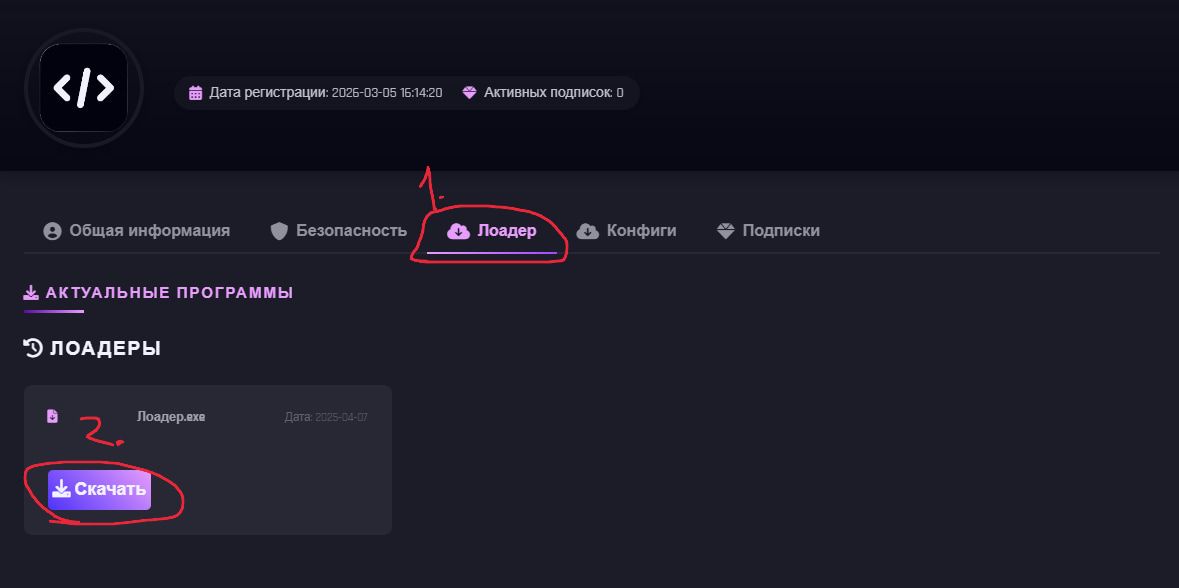
Downloading the Loader.
After registration, open your profile page: https://ret9.xyz/profile.php
Launching the loader.
Open the downloaded Loader file and wait until it is fully downloaded.
Inject.
In the program window, click the Inject button.
Launching the game.
After clicking Inject, Majestic Launcher will automatically launch.
Connecting to the server.
Launch the game through the Majestic Launcher. Join the desired server. Wait for the server to fully load.
Activating the menu.
Once fully loaded, press the DEL (Delete) key on your keyboard to open the menu.
Video instruction: https://www.youtube.com/watch?v=79wYbFLlgBM