🚀 Arcane for ROB RUN — Installation & Launch Guide (EN)
🔗 Main Link: Mega.nz
🔗 For users from Russia: Yandex.Disk
⚙️ Step 1: Mandatory System Preparation
Completing these steps is mandatory. Skipping any item will result in errors or a ban.
Install required components:
Microsoft Visual C++ Redistributable (x64). (If the system reports it is already installed, you can skip this step).
Complete removal of antiviruses and anti-cheats:
❌ Uninstall all third-party antiviruses.
❌ You MUST uninstall Faceit Anti-Cheat and Riot Vanguard. Use
Win + R→appwiz.cpland uninstall them via the standard programs window. Simply disabling them via CMD is not enough!
Disable Windows Protection:
Disable Windows Defender.
Disable SmartScreen.
Reboot:
You must restart your computer before launching the software to apply all changes.
🖥️ Step 2: Overlay Configuration
There are two options for rendering the cheat menu. Choose only one! Using two overlays simultaneously will prevent the menu from displaying.
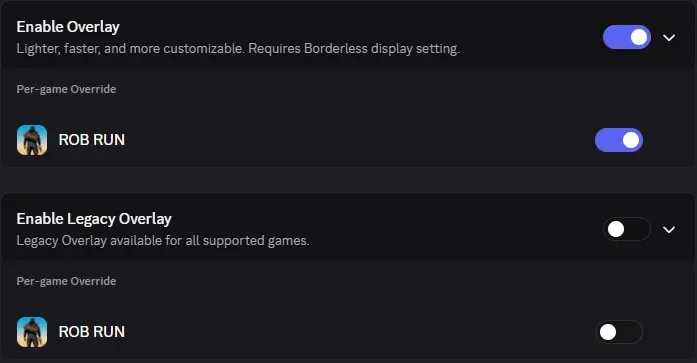
Go to Discord Settings → Game Overlay.
Enable the new overlay for the game ROB RUN.
Disable the "Legacy overlay" and uncheck ROB RUN in this section.
Second overlay option: Download and install: Medal.tv
Log in and enable the overlay in the settings.
🚀 Step 3: Product Launch
Download and run the loader.
Enter your activation key.
Note: On the first launch, the computer may restart automatically. This is normal behavior.
After the restart, ensure that Discord or Medal is running, and launch the cheat again.
Wait for the injection (the loader window will disappear). Only after this should you launch the game.
🔧 Troubleshooting Common Errors
❌ "Please make sure PIN is not set... and manually disable Hyper-V"
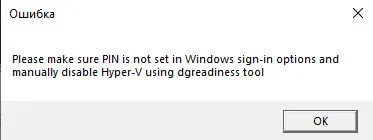
The most common error. To fix it:
Disable Windows PIN: Completely remove the password/PIN at system login (Settings → Accounts → Sign-in options).
Download the tool: DG Readiness Tool.
Extract the archive to your desktop. Open the folder, hold Ctrl + Shift, and right-click on an empty space → "Open PowerShell window here".
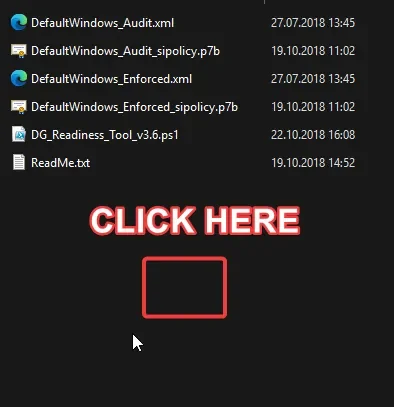
Enter the command and press Enter:
Set-ExecutionPolicy -Scope Process -ExecutionPolicy Bypass. If prompted, press Y (Yes to all).Enter the second command:
.\DG_Readiness_Tool_v3.6.ps1 -DisableAfter execution (the text might be red, this is normal), restart your PC. If you get a black screen during boot, press the F3 key a few times.
❌ Error "Failed to map memory"
Requires at least 12 GB of RAM. If you have less, contact the seller for a refund.
Disable all programs in startup and restart your PC.
If that doesn't help: download AutoRuns, find and disable all programs located at
CurrentVersion\Run.
❌ Error "Make sure all antiviruses are disabled" (Windows 10)
Uninstall all third-party antiviruses.
Disable real-time protection and SmartScreen in Windows Defender.
❌ Error "Make sure all antiviruses are disabled" (Windows 11)
Download both files from the support archive (Turn_ON and Turn_OFF).
Run Turn_ON, agree to the registry changes, and restart your PC.
Then run Turn_OFF, agree to the changes, and restart your PC.
If that doesn't help, ensure the antivirus is actually uninstalled, not just disabled.
❌ BIOS and Virtualization Errors (VT-X / AMD-V / Secure Boot / VMX)
Intel VT-X / AMD-V: Enter BIOS and enable "Intel Virtualization Technology" (or "AMD-V" / "SVM mode").
Secure Boot: Enter BIOS and disable the Secure Boot feature.
VMX/SVM is not supported: Disable "Virtual Machine Platform" and "Hyper-V" in Windows features. Then, in CMD (as admin), run:
bcdedit /set hypervisorlaunchtype offand restart.
❌ Error "Unsupported firmware"
Your OS disk is in MBR format. Convert it to GPT using the built-in Windows mbr2gpt utility or third-party disk managers.
❌ Interface Issues (menu is not clickable / disappears)
Launch Steam WITHOUT administrator privileges.
Disable the EA App overlay (if playing through EA).
Disable all third-party overlays
If there was a game patch, wait for the cheat update or verify the integrity of game files (a full reinstall is better).
❌ Error "AES instruction set is not supported"
Your processor physically does not support the AES instruction set. This cannot be fixed. Contact support to arrange a refund.
If all steps were completed correctly, the cheat is ready for use. Enjoy your game!