Complete system preparation
- Press Win + R, type appwiz.cpl and press Enter.
- In the list of programs, remove anti-cheat (Faceit, Vanguard) and third-party antiviruses.
Install all libraries:
Installing the loader
- Follow the link and download the loader.
- https://mega.nz/file/vEkWARKI#YB2oEBLCJ3XIYVBVCJU_YDfQrnQ_eP62-bvOz40ExPQ
- Create an account (If you have any problems registering in the cheat and other things, use a VPN).
- After registration, click "Activate Key" and enter your key.
- Click "Download Loader".
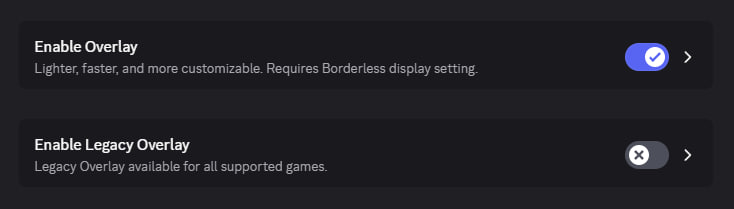
Setting up Discord(Do this before injection.)
- Open Discord settings.
- Disable the legacy overlay and enable the overlay.
Injection process
- Launch the loader, enter your account details and click "Login".
- You will see a list of games. Right-click on the game image and select "Start."
- Once the installation is successful, a confirmation window will appear and the loader will close automatically.
- Launch the game, press F5 in the main menu and wait for the in-game menu to appear.
If you have any problems, please contact support.