 Discord
 Telegram
Verified buyers only
Only a confirmed buyer can leave a review
 Rob Run
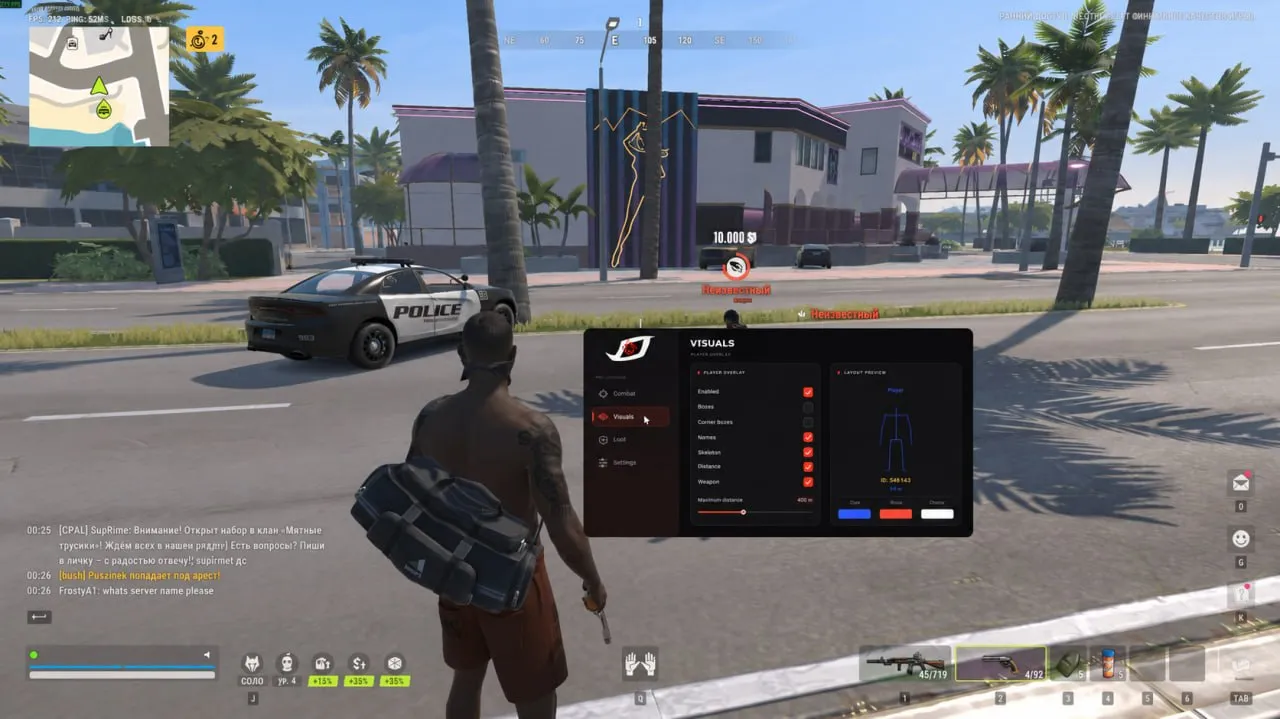
Hidden is a Rob Run cheat for PC with an aimbot, player ESP and loot filters. It supports Steam and Epic Games clients on Windows 10 and Windows 11 with Intel or AMD processors. AIMBOT offers an activation hotkey, adjustable FOV and smoothing, target-bone selection and an option to ignore knocked players. VISUALS includes boxes, names, skeletons, distance and weapon labels. Role colors distinguish characters, while Layout Preview helps arrange the overlay. LOOT separates items, loot points, cargo and cash loaders, with category filters for weapons, ammo, armor and equipment. Hide empty and the maximum-distance setting help reduce marker clutter. Use windowed or borderless mode. No USB flash drive is required; a spoofer is not included. Keys are available for 1, 3, 7 or 30 days.
Hidden for Rob Run supports PC play through Steam and Epic Games. Choose this build when you want a hotkey-driven aimbot, readable player markers and loot filters you can tune to your route. The Hidden aimbot lets you keep aiming assistance on a separate key instead of using it throughout an encounter.
Hidden ESP uses role colors to distinguish characters, with Layout Preview for arranging labels. Run the game in windowed or borderless mode. The Hidden cheat supports Intel and AMD processors and needs no USB drive; a spoofer is not included. Compare the available builds in the Rob Run catalog before choosing your key.
Purchase the product to leave a review
Review integrity
Only a confirmed buyer can leave a review
A moderator checks every review before it goes live
Reviews can’t be ordered or deleted
The author can edit it at any time
Инжектнул за минуту без каких-то проблем, устраивает читуха
Frequently Asked Questions
Select a question from the list on the right to see the answer
Hidden for Rob Run combines aiming assistance, player ESP and loot filters on PC. Player information and item markers have their own menu sections, so you can build a readable overlay around the task at hand rather than keeping every available label on screen.
AIMBOT starts with a Hotkey for activation and a FOV setting for the target-selection area. Show FOV draws that area on screen, making it easier to see which characters fall inside it. A tight area keeps selection close to your crosshair; a wider one covers more of the scene. Choose the size to suit the encounter, because close-range fights and distant observation call for different selection areas.
The Hidden aimbot includes Smooth for adjusting how gradually aim moves toward a target. Tune smoothing alongside FOV if the movement feels too abrupt. Target Bone offers Head, Neck, Chest, Stomach and Nearest, allowing you to choose a specific body point or the nearest bone. Ignore knocked removes downed targets from consideration so they do not draw aiming assistance away from the ongoing fight. Target Filter provides a separate control for target selection.
VISUALS offers full boxes and corner boxes to separate a character from the background. Skeleton shows body position, while Names, Distance and Weapon add context to the figure. If labels crowd a nearby character, remove the details you do not need before changing their arrangement in Layout Preview. The preview gives you a place to check the overlay layout.
Role colors helps distinguish characters by role without reading every label in sequence. This is useful when several figures stand close together. Maximum distance limits player ESP range: lower it when distant markers distract from the street or courtyard you are watching. The player range and loot range are separate settings, so reducing item clutter does not require you to use the same viewing distance for characters.
The LOOT section separates Objects from Loot Categories. Objects covers loot, loot points, cargo and cash loaders; categories narrow item markers to weapons, ammo, armor and equipment. If you are looking for supplies rather than equipment, leave the relevant category enabled to reduce the number of competing labels. The Hidden cheat lets you choose the layer of information you need.
Hide empty removes empty objects from the display. Dropped loot controls markers for discarded items, which you can switch off when they are irrelevant to your route. Max distance limits how far away loot is shown, while Distance displays the range to a marked item. Use the first to keep the search area manageable and the second to judge the journey to a particular marker.
Hidden supports Windows 10 and Windows 11, Intel and AMD processors, and Steam and Epic Games clients. The requirements list all graphics cards. Run Rob Run in windowed or borderless mode. No USB flash drive is required, and a spoofer is not included with the product.
Choose a key for 1, 3, 7 or 30 days. The linked instructions cover the Loader.exe launch sequence and when to open the game. SETTINGS includes Menu key and Unload key, allowing you to assign controls that do not clash with your game bindings. Compare other builds and their requirements in the Rob Run cheat catalog before making your choice.