 Discord
 Telegram
Verified buyers only
Only a confirmed buyer can leave a review
 DayZ
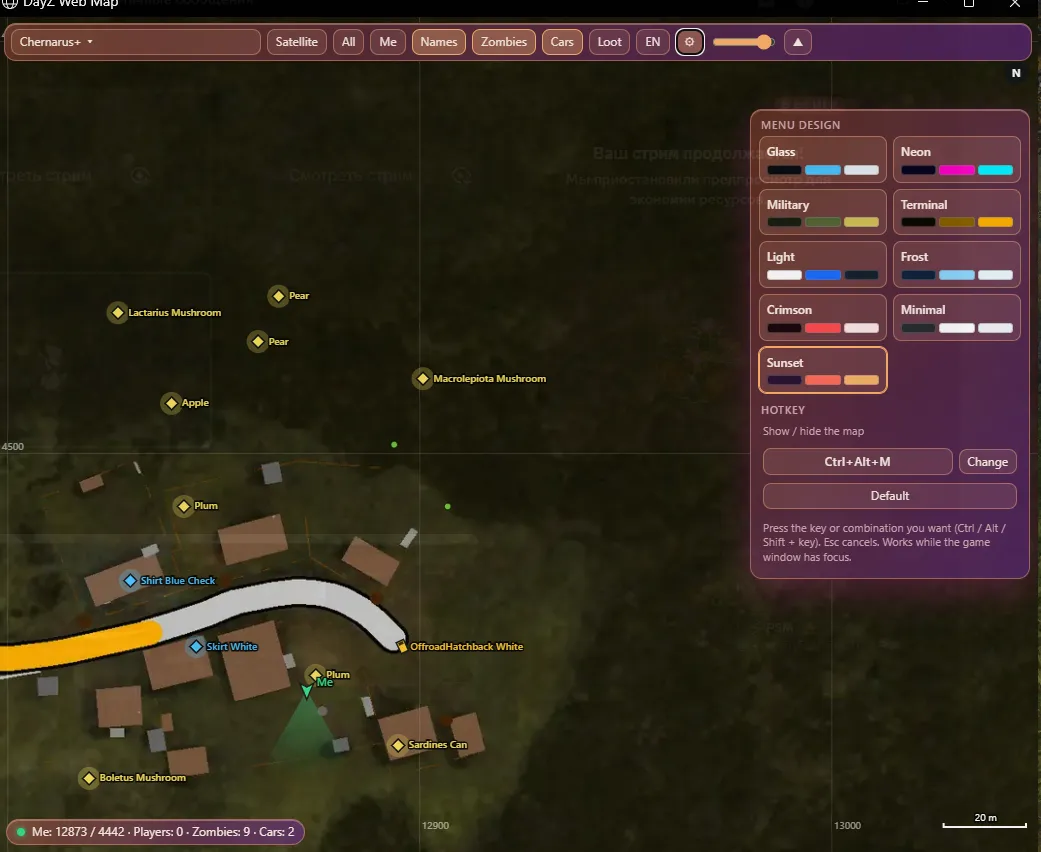
Focus Web Map for DayZ on Steam is a separate window with satellite and topographic maps, player markers, zombies, vehicles and loot. Keep the map above the game or move it to a second monitor, then adjust filters, colors and opacity.
Focus Web Map DayZ is a Steam map tool in a separate Windows window.
Keep the window above the game or move it to a second monitor. This variant is for reading a map with configurable marker categories. Judge it by its window, filters and map controls rather than assuming that features from another Focus build are included.
The listed systems are Windows 10 22H2 or Windows 11 25H2, with x64, GPT and UEFI; AMD and Intel CPUs are supported. The map toggle defaults to Ctrl+Alt+M and can be reassigned. Compare other builds individually in the DayZ catalogue.
Purchase the product to leave a review
Review integrity
Only a confirmed buyer can leave a review
A moderator checks every review before it goes live
Reviews can’t be ordered or deleted
The author can edit it at any time
Share your impressions after the purchase — it helps other players choose.
Frequently Asked Questions
Select a question from the list on the right to see the answer
Focus Web Map DayZ is a Steam map tool with players and loot in a separate window.
Satellite and topographic views offer different ways to read the terrain. You can choose the view first, then decide which markers belong on it. The window can stay above the game or move to a second monitor. Your position, view direction and the scale bar help relate the markers to locations and distances on the map.
The map list contains 28 maps, with automatic detection of the map loaded in DayZ. Use the mouse wheel to zoom and drag to pan. This is useful when you move between the area around your own marker and a wider view of the terrain. The full map button restores an overall view, so you do not have to reverse each zoom step manually after inspecting a small area.
The coordinate grid and distance scale bar answer different questions. The grid helps locate a point by coordinates, while the bar explains distance at the current zoom level. Your coordinates and altitude appear in the status bar. Follow own marker keeps the map centered around your position; manual panning is useful when you want to inspect another part of the map.
Your marker includes a view direction, and other player markers also show direction. That means a mark carries more information than position alone. Nicknames can be toggled separately, so you can remove overlapping labels while keeping player locations visible. Dead players have separate markers, and player health is also part of the display.
Zombies and vehicles have their own toggles. Cars and boats include a name and direction, which is useful when transport is the current priority. You can keep that group visible without reading every marker category at once. Own marker, players, zombies and vehicles have separate colors, letting you distinguish the groups against the selected map background.
The map displays ground items and removes markers for items that have been picked up. Categories are independent: weapons, ammunition and medical supplies can remain visible while unrelated groups are hidden. If you switch to gathering equipment, clothing, backpacks and tools can be selected instead. The filter reduces the number of labels competing for space, so a chosen group is easier to read at the same zoom level.
Each category has its own palette color. Item names can be toggled separately from the loot display, which is useful when you first want to see where items are clustered and then read individual labels after zooming in. Weapons, ammunition and medical items are enabled by default, but that selection can be changed. Category colors do not replace the filters: a hidden category remains hidden regardless of its chosen color.
The map window stays above DayZ without taking focus from the game. Its opacity slider lets you adjust how much of the background remains visible. If you have a second monitor, the window can be moved there and its position is remembered. Collapsing the panel makes more room for the map, while resetting position and size restores the window after layout changes.
Ctrl+Alt+M shows or hides the map by default and can be replaced with another hotkey. Themes change the panel appearance, and both Russian and English interfaces are available. The listed setup is Steam with Windows 10 22H2 or Windows 11 25H2, x64, GPT and UEFI, using AMD or Intel processors. Other DayZ tools have separate feature lists; this variant is organized around the map and its window controls.