
 Discord
 Telegram
Verified buyers only
Only a confirmed buyer can leave a review
 UNTURNED
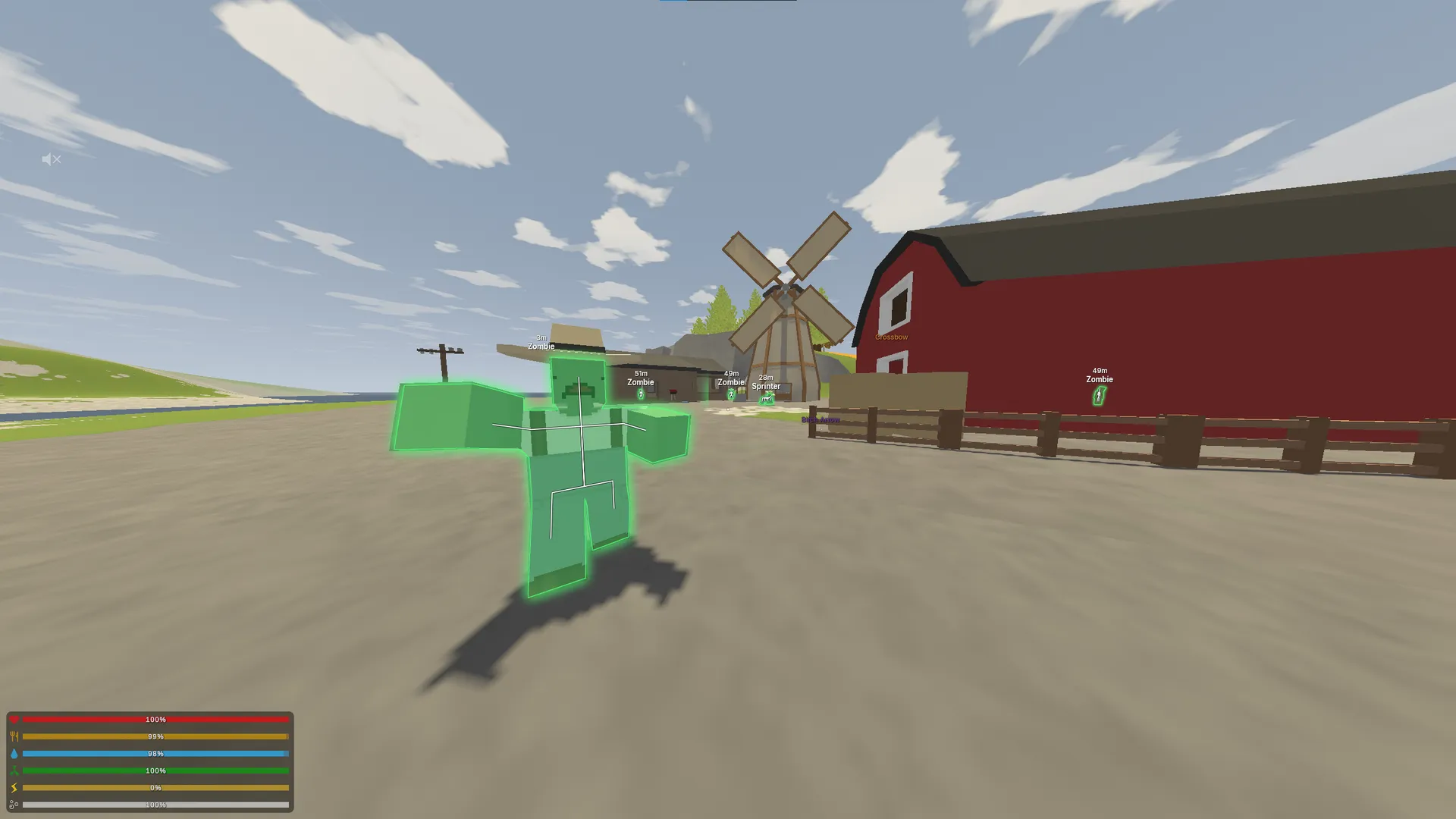
Focus for Unturned separates players, teammates and zombies, with filters for loot and vehicles. Model glow, labels and world appearance have independent controls, and configs preserve your preferred combination.
Focus for Unturned combines aimbot and ESP with separate player, teammate and zombie controls. Loot can be selected by type and rarity, while vehicles are filtered by resources and condition. This lets you choose what appears before deciding how its marker looks.
The supplied requirements list Windows 10 22H2 or Windows 11 25H2, x64, UEFI and GPT, plus Intel or AMD processors and any graphics card. They do not name a specific game client, so client compatibility should be confirmed before selecting this build.
Aiming separates players from zombies. Model glow, boxes and labels can be tuned independently, with configs retaining the combination. Streamproof is stated for hiding the overlay in recordings and streams; it describes presentation rather than account protection.
Purchase the product to leave a review
Review integrity
Only a confirmed buyer can leave a review
A moderator checks every review before it goes live
Reviews can’t be ordered or deleted
The author can edit it at any time
Share your impressions after the purchase — it helps other players choose.
Frequently Asked Questions
Select a question from the list on the right to see the answer
Focus for Unturned organises the view around players, zombies, items and vehicles. Each group has its own selection conditions. That makes the first useful decision what should be shown, followed by how the selected objects should be styled.
Aim assistance selects players and zombies independently. Hold, Toggle and Always determine activation, while FOV, smoothing and distance govern the selection area and aiming behaviour. The circle and target line make that choice visible. Changing their colour or fill does not replace the target-type filter.
Player, teammate and zombie ESP use separate controls. Player model glow covers the body, clothing and held weapon, with outline and fill affecting the strength of the visual highlight. Skeletons and animated colours offer another presentation choice. If colour movement makes names or distances harder to read, a simpler style can retain those labels and the box without the same visual activity.
The type filter separates weapons, magazines, attachments, medical items and other categories. Rarity adds a second condition rather than replacing type selection. When searching for a particular set, narrow those conditions before choosing labels. This avoids turning names and distances into a list of every object in the surrounding area.
Circle markers have their own size and fill. Categories receive separate colours and toggles, while item model glow is also configured by category. Ground weapon glow is explicitly listed. These are different ways to represent the selected loot: a highlighted model helps locate the object, its name identifies it and distance gives context for how far away it is.
Vehicle ESP supplies names and distances, but range is not its only filter. You can show unlocked vehicles and set minimum fuel, health and battery charge. Each condition matters independently: fuel does not establish sufficient battery charge, and an unlocked vehicle may still fall below the selected health threshold.
A strict combination of filters can leave fewer markers visible. Check the selection conditions before changing colours or text appearance. Styling cannot expand the set of vehicles passing those thresholds. Maximum distance adds another boundary to the same selection, making it useful to review range and condition filters together.
Game FOV, zoom and free camera belong to the world section. Zoom can be restricted to weapons, while Fullbright has an option to preserve sky brightness. Sky, fog and cloud colours are separate from player visuals. Changing the environment therefore does not require changing the ESP palette or item selection.
Configs can be created, saved, loaded and deleted, with an option to load the last one at startup. Remember autosave when trying temporary changes, because intermediate settings may also be retained. Streamproof concerns overlay visibility in recordings, not the gameplay filters. Check the exact Windows configuration and confirm the client separately; the Unturned catalogue provides other builds to compare by their stated requirements and features.