Flamingo cheat for Squad

Cheat Flamingo for Squad

SQUADSQUAD
Undetected
20/11/2026

Flamingo is a Squad cheat with Aimbot, ESP, radar, and weapon and movement options. Its bilingual menu lets you customize and save your settings.

1 day369 GCC
I accept and agree to the terms of use.
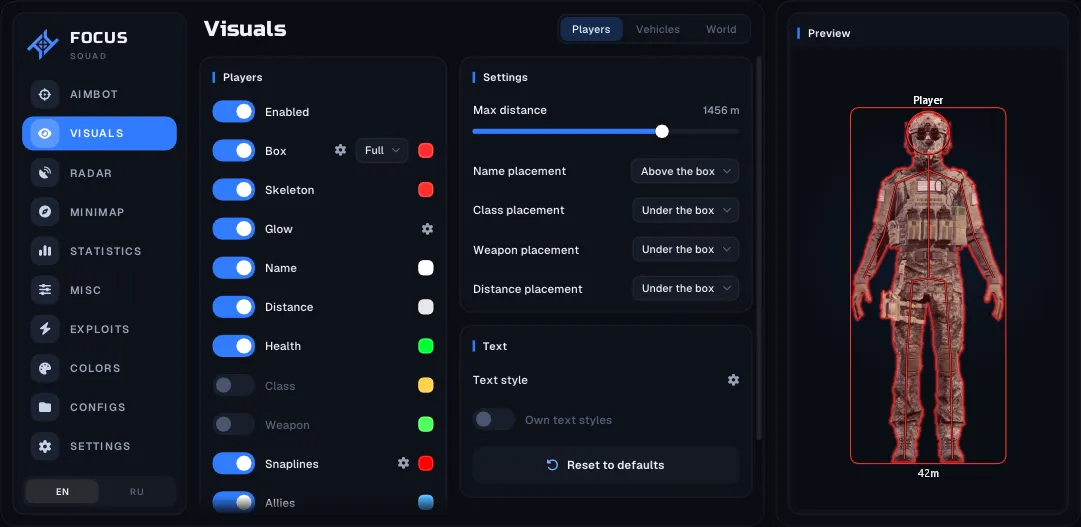
Flamingo is a cheat for Squad built around the game's large-scale team battles. It combines aiming tools, player and vehicle ESP, FOB structure markers, radar, and additional gameplay options in a single menu. The interface is available in English and Russian. You can customize element colors, assign hotkeys, and save or load configuration profiles. The feature categories cover infantry combat, vehicles, and forward base structures without requiring separate tools for each area.

Videos & Images

1 / 9

Recommended products

Frequently Asked Questions

Frequently Asked Questions

Select a question from the list on the right to see the answer

Where can you buy a SQUAD cheat?

Is there a Ballistic Aimbot for SQUAD?

What does Long-Range ESP show in SQUAD?

Is Vehicle ESP available for SQUAD?

Is there a Radar for SQUAD?

Which SQUAD cheat should you choose for infantry and vehicles?

Squad combines infantry combat, military vehicles, and forward base construction. Flamingo provides visual information for these different parts of the game, including soldiers, vehicles, and FOB structures. Its aiming section features Aimbot, Smart Aimbot, and Silent Aim with additional targeting options. A separate radar displays players and vehicle types. This hack also includes weapon, ammunition, movement, and graphics settings. The available controls are organized into categories, with the complete feature list provided above. After purchase, you receive a key, a loader, and launch instructions. Flamingo requires 64-bit Windows 10 on any build or Windows 11 up to and including version 25H2. Supported hardware includes Intel or AMD processors and NVIDIA or AMD graphics cards. The software works only with the Steam edition of Squad, and the game must be running in Borderless display mode. If ESP overlays appear misaligned, set Windows display scaling to 100% and use the same resolution in Windows and the game. No built-in spoofer is included. If your hardware is already HWID-banned, a separate compatible spoofer is required.