
 Discord
 Telegram
Verified buyers only
Only a confirmed buyer can leave a review
 SQUAD
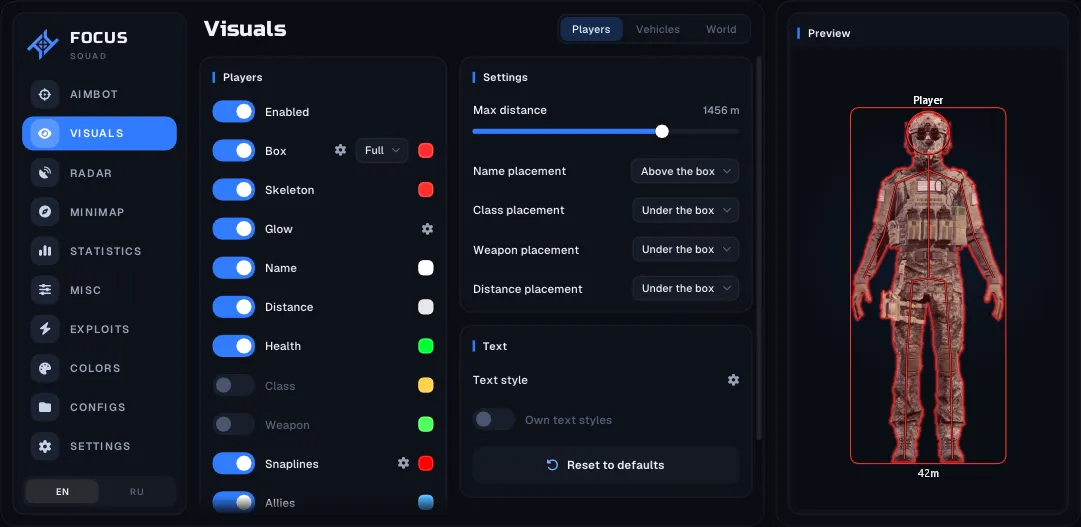
Focus for Squad combines aim assistance with infantry, vehicle and structure markers. Radar, minimap and in-game map settings are separate, while Battle mode narrows the visible information for the current engagement.
Focus for Squad combines aimbot with infantry, vehicle and structure ESP for Steam. Radar, minimap and in-game map markers have independent settings. You can limit additional layers instead of putting every map object onto the main scene.
Check Windows 10 22H2 or Windows 11 25H2, x64 architecture, UEFI and a GPT disk. Intel and AMD processors are listed, with any graphics card supported. The aimbot visibility check accounts for terrain and building collisions; mouse calibration belongs to aiming setup.
Battle mode reduces categories and labels according to your selected conditions. Hiding the overlay from recordings is a separate menu option. Vehicle and structure sections provide their own colours, icons and distance labels for a more detailed view when needed.
Purchase the product to leave a review
Review integrity
Only a confirmed buyer can leave a review
A moderator checks every review before it goes live
Reviews can’t be ordered or deleted
The author can edit it at any time
Share your impressions after the purchase — it helps other players choose.
Frequently Asked Questions
Select a question from the list on the right to see the answer
Focus for Squad connects infantry, vehicles and structures to several views of the battle. Scene ESP, compact radar and map layers provide different kinds of context. Configuring them independently is more useful than making every view repeat the same information.
Legit aimbot can select targets by FOV or distance. Only visible checks terrain and building collisions, while teammate exclusion applies a separate rule. Smoothing and maximum range govern aiming behaviour; the FOV circle and target indicator describe the selection visually. Mouse calibration and Squad ballistics belong to aiming behaviour rather than the appearance of that circle.
Head, chest and nearest hitbox are separate aim-point choices. They should not be confused with the treatment of downed players, who can have a distinct ESP colour. This lets you decide how targets are selected and how characters are displayed without collapsing both decisions into one general switch.
Vehicle types have individual colours, icons, boxes and glow settings. Per-type controls are useful when a tank and a transport vehicle should be recognisable at a glance. Global synchronisation serves the opposite purpose: it reduces repeated setup when the same appearance is suitable across several categories. Allied vehicles also have a dedicated colour.
HABs, FOB radios, repair stations and other structures distinguish friendly and enemy objects. Distance controls and text scaling help manage label density. Projectiles in flight have their own number and distance features, separate from the structures that may launch them. Scoped ESP is explicitly described for players, vehicles and structures, accounting for the image inside the optic.
Radar uses dots or icons in a chosen shape. The minimap adds Squad map imagery, a grid and the playable area boundary, with independent infantry, vehicle and structure filters. In-game map markers have separate category controls. Radar and minimap can be hidden while that map is open, preventing several similar panels from competing for screen space.
Battle mode narrows the visible information with a key press. Its conditions cover distance, visibility, enemies, downed players, vehicles, structures and labels. It can also hide radar and minimap. This supports a transition from a broad overview to a more restricted combat view. Recording exclusion is a different menu setting and should not be inferred from the Battle mode name.
Configs retain the selected combination of filters and presentation. Loading the last profile and choosing an autosave interval helps preserve that arrangement after colour or layout changes. Player, tank and crate previews provide a reference for their respective categories before you compare the result against gameplay.
The build also lists movement, weapon and environment modifications in distinct feature groups. Those functions should be assessed individually rather than assumed from the term ESP. Check Steam compatibility and the exact system requirements before choosing a plan. The Squad catalogue lets you compare other builds by the views and launch conditions you need, rather than by the number of switches alone.