Mouse polling rate is one of the parameters that directly affects how responsive controls feel in games. If your crosshair moves in a choppy way, your reactions seem delayed, or the cursor movement does not match your hand movement, the issue may not be related only to DPI or your mouse pad. In this article, we'll explain what polling rate is, how mouse Hz affects smoothness, which setting to choose for shooters, and how to check the actual data transfer speed between your mouse and computer. 🎯
What Is Mouse Polling Rate and Why Does It Matter for Gamers?
What is mouse polling rate? It is the number of times per second a device sends information about its position to the computer. In English-language software, this setting is called polling rate. The higher the value, the more frequently the mouse sends sensor movement data.
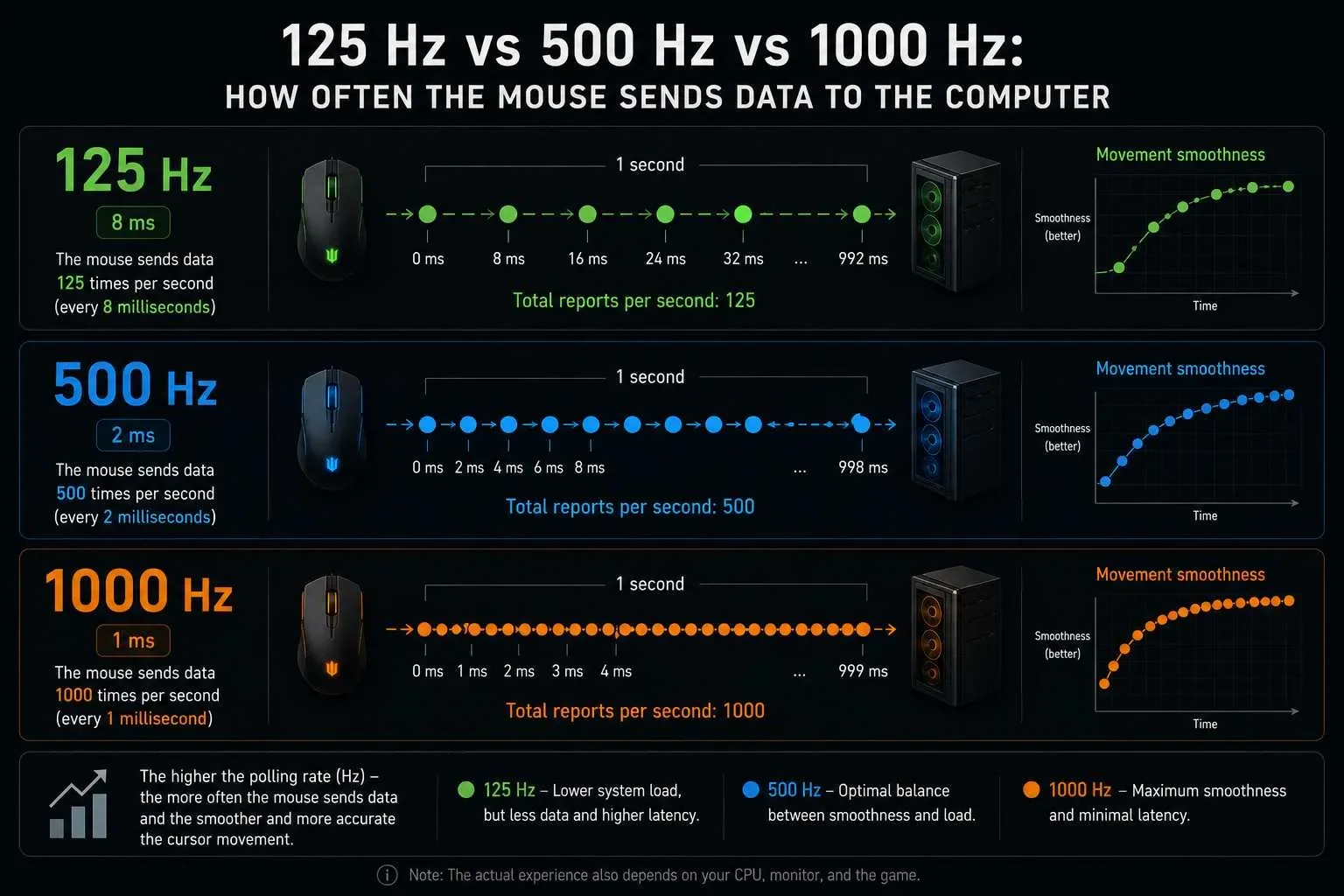
Mouse polling rate is measured in hertz (Hz): 125, 500, 1000, 4000, or 8000 Hz. If your mouse is set to 1000 Hz, it sends data to the computer 1000 times per second. In practice, this affects input latency, movement smoothness, and aiming precision in games.
What does Hz mean on a mouse? It refers to the update frequency between the mouse and the computer. The higher the polling rate, the less time passes between your hand movement and the cursor or crosshair updating on screen.
Polling rate determines how often the mouse reports its position to the computer. DPI controls sensitivity. They are different settings, but they work together in games.
How Is Polling Rate Measured?
The most common polling rate values are:
125 Hz — data is sent 125 times per second;
500 Hz — 500 updates per second;
1000 Hz — 1000 updates per second;
4000–8000 Hz — ultra-high polling rates available on modern gaming mice.
The higher the value, the lower the delay between device movement and system response. For example, at 125 Hz the update interval is approximately 8 ms, at 500 Hz about 2 ms, and at 1000 Hz around 1 ms.
What Does Polling Rate Affect?
What does mouse polling rate affect? Primarily crosshair smoothness, data transmission consistency, and overall system response time. With a low polling rate, cursor movement may feel less fluid, especially at high FPS and on high-refresh-rate monitors.
Simply put, mouse Hz determines how quickly and how often the system receives movement data. A higher polling rate helps transmit small hand movements more accurately, which is especially important in competitive shooters where every pixel matters.
Mouse Technical Specifications: DPI, Sensors, and Acceleration
A high mouse polling rate alone does not make a mouse perfect. Overall performance also depends on the sensor, DPI, shape, weight, mousepad surface, cable, or wireless connection. The best gaming mouse is not always the one with the highest numbers — balance between specifications matters more.
Optical vs. Laser Sensor
Optical sensors are generally preferred for gaming because they track surfaces consistently and accurately transmit movement data. Laser sensors can work on a wider variety of surfaces but may introduce unwanted acceleration or less predictable tracking.
For competitive shooters, a high-quality optical sensor is usually the better choice. It tracks hand movement more precisely, resulting in more stable aiming.
How DPI Affects Performance
DPI determines how far the cursor moves on screen relative to mouse movement. A higher DPI value does not automatically mean better performance. If DPI is set too high, aiming can become overly sensitive and difficult to control.
A common misconception is that high DPI can compensate for a poor polling rate. In reality, DPI controls sensitivity, while mouse polling rate determines how frequently movement information is transmitted to the system.
DPI — movement sensitivity;
Polling Rate — data reporting frequency;
Sensor — surface tracking accuracy;
LOD — lift-off distance;
IPS — resistance to tracking failure during fast flicks.
What Are LOD and IPS?
LOD (Lift-Off Distance) is the height at which the sensor stops tracking once the mouse is lifted off the mousepad. A low LOD is beneficial for players who frequently reposition their mouse during gameplay.
IPS (Inches Per Second) measures how fast a sensor can track movement without losing accuracy. If IPS is too low, fast flicks may cause tracking errors. For fast-paced games, a sensor should maintain accuracy even during rapid hand movements.


![Instructions for EXLAB | SPOOFER [BE]](https://s3.twcstorage.ru/fe31f4c7-f7ba-44ea-ac34-dc54aec27b75/blog-covers/generated/d210ba4886873c77295dbe8fb019982513950a4dc8292d326fcc9a6a653f8492.webp)