
Preparation for installation:
1. DISABLE WINDOWS DEFENDER
Start → Settings → Update & Security → Windows Security • Virus and Threat Protection → Manage Settings • Temporarily disable Real-time Protection
2. DISABLE HYPER-V and VIRTUALIZATION IN BIOS
Control Panel → Programs and Features → Turn on Windows features • Uncheck "Hyper-V" • Restart your computer
Also disable virtualization (VT-X) in the BIOS.
3. DISCONNECTING THE VIRTUAL MACHINE PLATFORM
Win+R → enter “optionalfeatures.exe” • Uncheck “Virtual machine platform” • Restart your computer
4. GAME WINDOW MODE
In the game settings, select: - Windowed mode - Windowed mode without border - Full screen mode • "Windowed mode without border" is recommended
5.DISABLE INTEGRATED GRAPHICS
Device Manager → Display Adapters • Right-click Intel HD Graphics • Select “Disable Device”
6. INSTALLING DIRECTX9 AND VISUAL C++
Download: https://aka.ms/vs/17/release/vc_redist.x64.exe
• Restart your computer
- Close thethe game for which you have a cheat completely
- Disable antivirus during installation
7. Setting up Discord (Only for ESP and FULL versions)
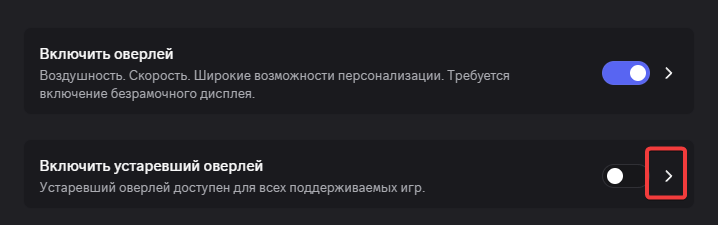
- Open Discord → Settings → Game Overlay → Enable Overlay
- Disable the outdated overlay: Settings → Advanced → Hardware Acceleration → Enabled
Installation process:
- Register in the personal cabinet
- Activate the key in the personal cabinet
- Download Loader: https://courierscript.ru/lk/lk
- Move the file to a separate folder on a flash drive
- Run Loader as administrator
- Wait for loading
- Press OK and launch the game for which you have a cheat
- Be sure to remove the flash drive after clicking "OK"
- (WEB-RADAR ONLY) As soon as you are logged into Rust, you will have a beep
- (WEB-RADAR ONLY) A browser with a radar will open, you can share this link or open it from your phone
Так же отключите виртуализацию (VT-X) в биосе.