
 Discord
 Telegram
Verified buyers only
Only a confirmed buyer can leave a review
 Oxide: Survival Island
AQREH is a cheat for Oxide: Survival Island on Android, featuring aiming tools, ESP, farming, and extra settings. No root access is required.
AQREH is an Oxide: Survival Island cheat for Android with no root and ESP split across five tabs. It will not run on an iPhone: for iOS the section has AQREH IOS, and on a PC through an emulator there is Ryvora.
It suits you if you want to know who is nearby and where the thing you came for is before you move. The feature list below comes from the menu screenshots, and those only have that section open. Aimbot and Farm are in the menu too, but their settings are not shown, and this card does not list Silent Aimbot. If combat features are what you are choosing on, look at Lebro, which has Magic Bullets, a triggerbot and a radar.
Purchase the product to leave a review
Review integrity
Only a confirmed buyer can leave a review
A moderator checks every review before it goes live
Reviews can’t be ordered or deleted
The author can edit it at any time
Share your impressions after the purchase — it helps other players choose.
Frequently Asked Questions
Select a question from the list on the right to see the answer
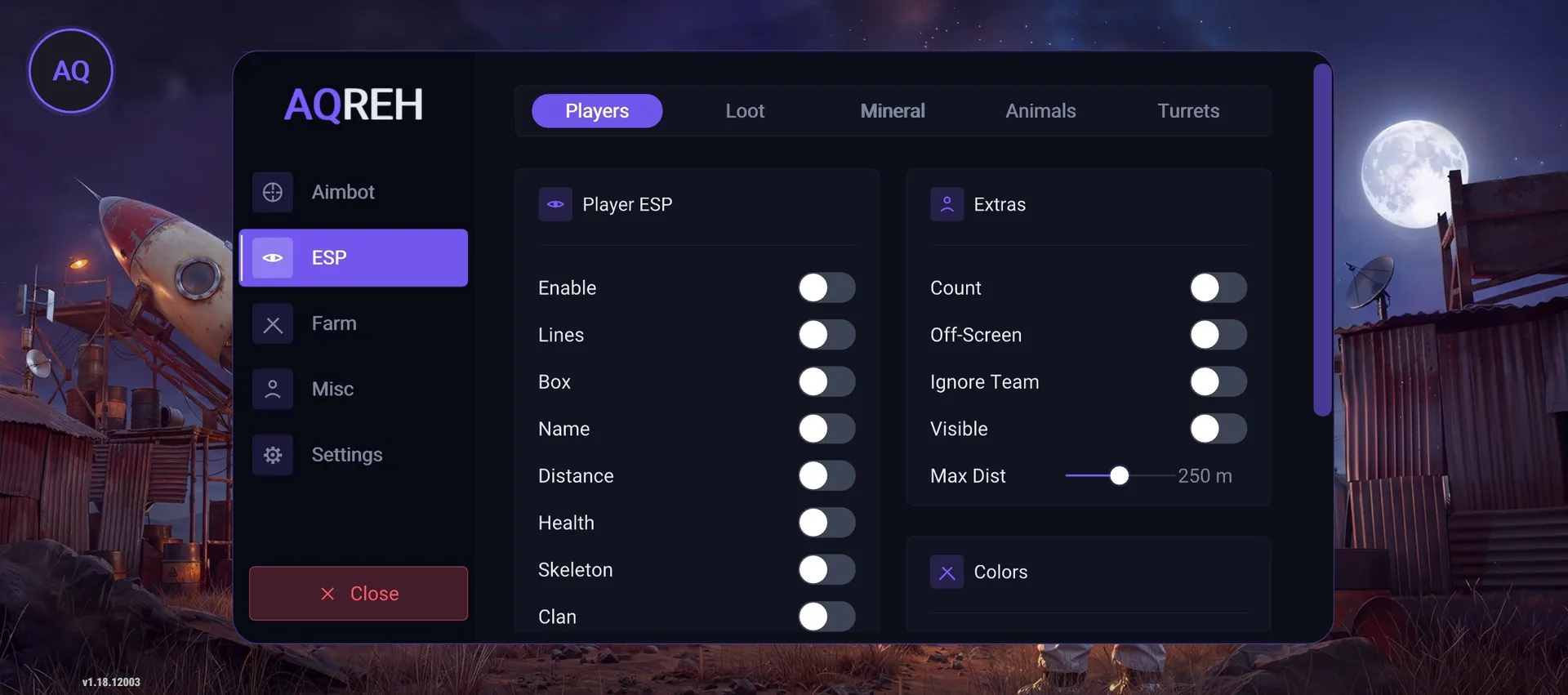
AQREH is an Oxide: Survival Island cheat for Android that needs no root. Its mod menu opens right over the game, and the ESP is split into five tabs: players, loot, ore, animals and turrets.
The left rail has five sections: Aimbot, ESP, Farm, Misc and Settings. A Close button clears the panel so it does not block your view in a fight.
Both screenshots have ESP open, so that section is covered here. Aimbot and Farm are on the feature list, but their settings are not shown.
The Players tab opens with the Player ESP block, where Enable, Lines, Box, Name, Distance, Health, Skeleton and Clan each have their own toggle, so you can build the screen around the job. A line tells you where someone is coming from, distance whether you have time to move, health whether the fight is worth taking, and the skeleton whether they are standing around or already aiming. Clan matters because one tagged player nearby can mean the rest of the clan is close.
Lines are usually the first to go at a base or in a crowd, because many players turn them into a web. In the open, keep them on, because someone behind a tree or a fence is easy to miss.
The second screenshot shows this in the game. An Enemies: 3 counter sits at the top, and green lines run out to players, each with a name, a distance of 125 m or 55 m and a health bar. The closer player's green skeleton is drawn over a wooden fence, with a clan tag in square brackets above the name.
Extras sits to the right of Player ESP. Count is that enemy number, so one glance before a resource run tells you whether the area is quiet. Off-Screen covers players outside the frame, which matters on a phone, where the view is tight and the danger usually comes from the side. Ignore Team takes your squad out of the ESP, otherwise allied boxes get in the way of spotting everyone else.
Max Dist is a range slider, set to 250 m in the screenshots. In tight buildings you pull it in, otherwise far-off labels land on top of close ones. A Visible toggle and a Colors block sit nearby.
The top row also holds Loot, Mineral, Animals and Turrets. They are closed in the screenshots, but their purpose is clear from the game. Ore goes into tools and buildings, and the faster you find it, the less time you spend exposed. Animals mean meat and hides. A turret fires on its own, so near someone else's base you want to know about it before the first shot. Separate tabs keep a fight about players and a farming run about ore.
Operating System says Android, with no version number given. Root Access says Not required, so this is a non-root build and you will not have to root your phone. If you want to try it on your own device first, pick a short term: keys come in 1, 3, 7 or 30 days. The key is issued right after purchase and stays in your account with its expiry date.
It will not run on an iPhone. For that there is AQREH IOS, which installs through an iOS certificate and adds Silent Aimbot on its card. On a PC, Ryvora runs in the MSI App Player emulator. For more combat features on Android, look at Lebro, which has Magic Bullets, a triggerbot and a radar and runs in a virtual environment. Other Oxide cheats are on the Oxide: Survival Island page.