 Discord
 Telegram
Verified buyers only
Only a confirmed buyer can leave a review
 Rob Run
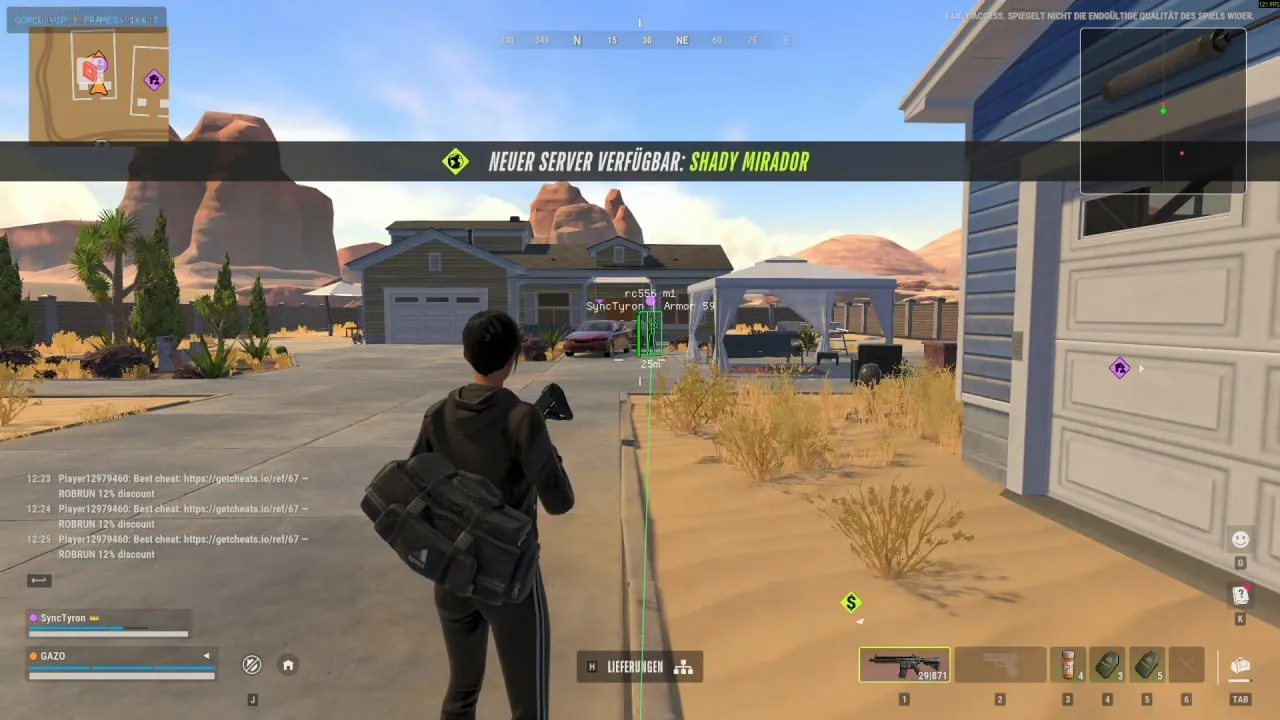
QOWED runs on a separate PC connected to a DMA card in your ROB RUN gaming PC. Player ESP distinguishes roles and displays carried loot with its value. Loot filters help narrow down items, while Web radar shares a live browser map with your party and Live Config lets you change settings from the gaming PC. Aimbot, triggerbot and RCS require a MakCU, KMBox or Arduino mouse device. Use a fuser for an overlay over the game, or display it on a second monitor. Redeem the key in your QOWED account; its first launch binds it to the loader PC.
QOWED DMA for ROB RUN needs a second PC and a DMA card. The game stays on your gaming machine; the loader runs on a separate Windows 10/11 PC linked to the card by USB. Prepare the hardware before activating the key, which covers the software.
Choose how you will see the overlay: a fuser places it over the game, while a separate monitor can display it on its own. Hardware aiming also needs a MakCU, KMBox or Arduino mouse device. Web radar shares the map in a browser, and Live Config lets you adjust settings from the gaming PC.
Purchase the product to leave a review
Review integrity
Only a confirmed buyer can leave a review
A moderator checks every review before it goes live
Reviews can’t be ordered or deleted
The author can edit it at any time
Share your impressions after the purchase — it helps other players choose.
Frequently Asked Questions
Select a question from the list on the right to see the answer
QOWED DMA for ROB RUN combines ESP, hardware aiming and a shared browser map. Plan the setup first: the game and DMA card belong in the gaming PC, while a separate computer runs the loader. With that arrangement ready, you can keep nearby loot in the overlay and use Web radar for a wider view with your party.
Player ESP assigns separate colours to cops, robbers, civilians and party mates. Role colours help distinguish characters standing together, while Weapon in hand and Armor indicator describe their equipment. Names and distances add context, so reduce the ESP range when distant labels distract from the players you are watching nearby.
Loot carriers displays what a player is carrying and its value. That separates a person transporting valuables from loose items around them. Knocked and cuffed status adds another distinction. Players hiding in lockers retain a last known position marker; treat it as a record of the last observed location rather than a fresh confirmation of where the character is now.
The Word filter narrows labels to names such as gold and jewelry. Use it when you want particular items, because showing every loot spot makes individual finds harder to pick out. A narrow filter helps when searching for valuables, so turn it off when you need a broader view of available items. Hide already looted spots removes spent locations, while the lock state on safes and lockers adds context before you approach a container.
Cash points show the amount, and Cargo has its own toggle and colour. Loot range is separate from player ESP range, so nearby items can remain readable without shrinking your view of surrounding players. A loot hotkey lets you remove item labels during travel, then restore them when searching a building. Optional parked vehicles serve a similar purpose when stationary cars crowd the scene.
The aimbot uses a MakCU, KMBox or Arduino mouse device. Triggerbot and Recoil control (RCS) need that hardware too: the DMA card supplies data, while the mouse device handles input. Recoil compensation addresses weapon movement and is separate from target selection. Party mates are never targeted, so ally colours and aiming exclusions solve different parts of the setup.
Vehicles includes cars and helicopters coloured by occupant role. Occupants and siren status provide context beyond a vehicle marker. A parked-car toggle helps focus the display on occupied transport. The Proximity warning is separate: its direction and distance draw attention to an approaching player instead of requiring you to inspect every label.
ROB RUN Web radar shares a live map with party mates in a browser. It supports a broader conversation about positions, while ESP keeps labels attached to objects in the scene. Live Config changes settings from the main PC; Config Cloud saves configurations and shares them by code, so you can return to a familiar set of filters after trying another layout.
Install the loader on a separate Windows 10/11 PC connected to the DMA card by USB. A fuser places the overlay over the game, or a second monitor can show it separately. The first loader launch binds the key to that PC. Compare your equipment with these requirements before activating. The ROB RUN DMA section groups software for this hardware arrangement; the QOWED profile identifies the developer.