 Discord
 Telegram
Verified buyers only
Only a confirmed buyer can leave a review
 DayZ
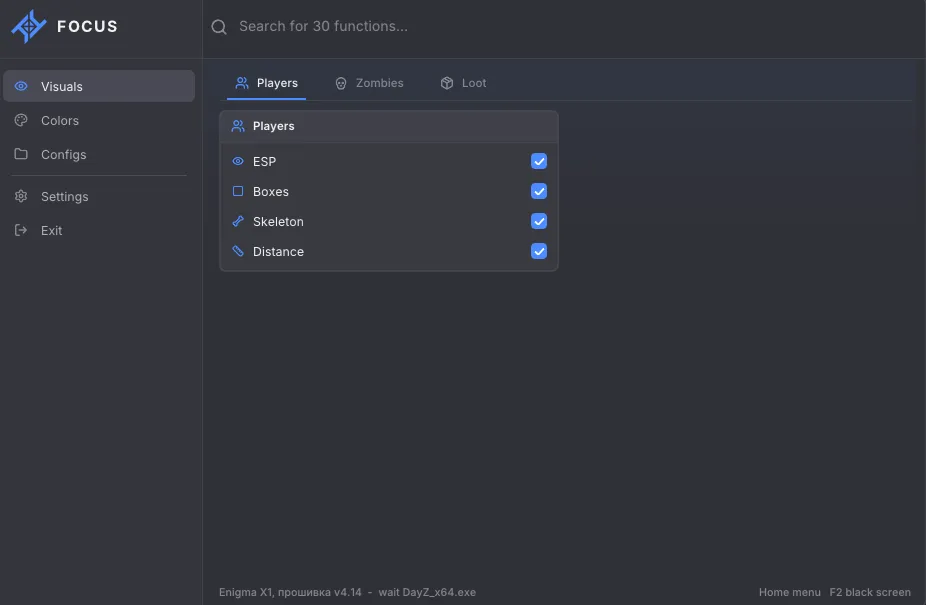
Focus DMA for DayZ on Steam provides player boxes, skeletons and distance alongside item ESP with separate loot category filters. Named configs store settings, while the Output section includes Black screen on F2.
Focus DMA DayZ is a DMA build for Steam with player and item ESP.
This product's controls focus on visual markers and loot categories. Features from another Focus DayZ build do not automatically belong to this one: compare the specific feature list and menu shown on this card.
The system requirements list Windows 10 22H2 or Windows 11 25H2, x64, GPT and UEFI, with AMD or Intel processors. Menu key and scale are adjustable; Output includes Black screen on F2. Other software options have separate cards in the DayZ DMA catalogue.
Purchase the product to leave a review
Review integrity
Only a confirmed buyer can leave a review
A moderator checks every review before it goes live
Reviews can’t be ordered or deleted
The author can edit it at any time
Share your impressions after the purchase — it helps other players choose.
Frequently Asked Questions
Select a question from the list on the right to see the answer
Focus DMA DayZ is a Steam DMA build with player ESP and category-based loot filters.
Players and items have separate display controls, so you can keep character outlines while limiting item markers to the categories you need. The menu also includes function search, named configs and an output section. A chosen layout can be changed for a different task without treating every visible element as part of one fixed setup.
Player ESP has a master switch, with separate controls for boxes, skeletons and distance. A box marks the character's position, a skeleton adds the shape of the model, and distance tells you how far away the marker is. These elements answer different questions. If extra lines make the view harder to read, you can remove the skeleton while keeping the box and distance label.
Separate switches are useful for comparing layouts without turning player ESP off altogether. Position may be enough for one task, while the shape of a model matters for another. The distance label remains an independent part of that choice. In practice, building the layout one element at a time makes it easier to decide which information you actually need on screen.
Item ESP has its own enable switch, boxes, names and distance. Names distinguish objects within the same group, while distance helps compare their locations. That means item labels can remain useful even when you remove the surrounding boxes. If labels are too dense, you can adjust the display choices and decide which elements carry enough information for the current search.
Weapons, medical items and ammunition suit one set of priorities; food and clothing can be selected for another. Containers have a separate category from miscellaneous items, so you do not have to search every available group at once. When your task changes, adjusting the categories reduces the number of unrelated marks to read. Categories select the objects shown, while boxes and names determine how those objects are represented.
Save a config under a chosen name, then select it from the list when you want to load it. The delete control removes the selected saved config. This is useful for keeping different player and loot layouts, because switching a named setup avoids revisiting each tab to rebuild the same combination. Give configs distinct names so their purpose is clear in the list.
Menu scale changes the interface size, and the menu key can be assigned separately. Home is shown in the screenshots as the selected key. Accent presets and a custom accent color change the menu appearance; they do not replace the ESP controls. Reset menu settings has its own button, and function search at the top of the window helps locate a setting when you need it.
Output includes Black screen, controlled with F2. It is an output option, separate from enabling player or item ESP. If you only want fewer marks, change the relevant display controls or category filters first. Exit is located in the sidebar, keeping that action separate from choosing a config or adjusting the menu appearance.
The listed game client is Steam. Windows 10 22H2 or Windows 11 25H2, x64 architecture, GPT partitioning and UEFI firmware mode appear alongside AMD and Intel CPU support. These requirements belong to this specific product, so the Focus family name does not replace checking them. Other builds in the DayZ DMA catalogue have their own controls and requirements. Compare those details while keeping the individual software variants separate.