
 Discord
 Telegram
Verified buyers only
Only a confirmed buyer can leave a review
 VALORANT
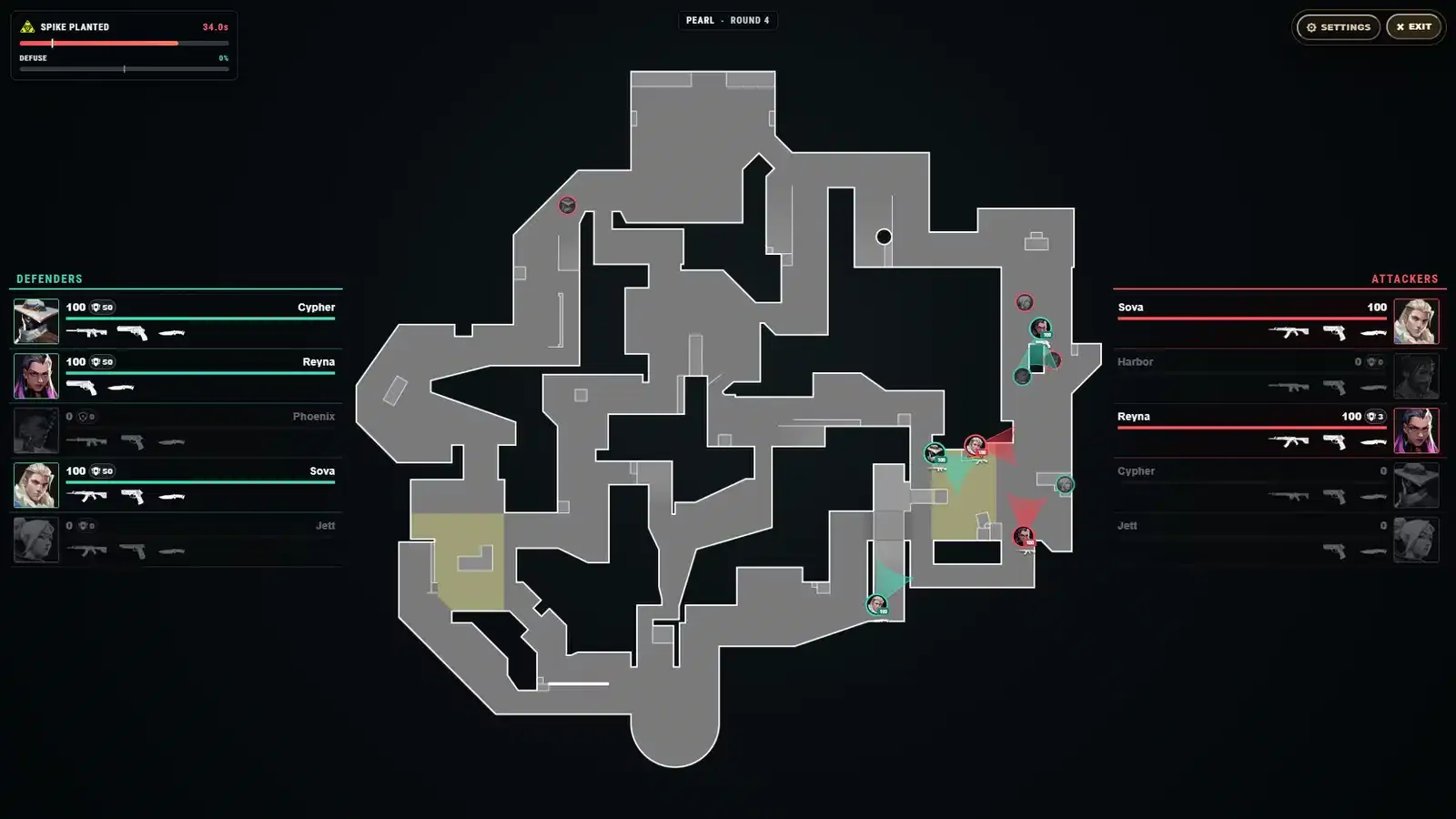
Web Radar for VALORANT puts the round map in a browser: live positions for every player, agent icons, vision cones, health and shields, the weapon in hand and the full loadout. The Spike is tracked on its own — who carries it, where it was planted, how long until it detonates and how far the defuse has got. After halftime the radar swaps attackers and defenders by itself. It opens on a PC, tablet or phone, goes full screen, and the radar link can be shared with friends.
Web Radar is a VALORANT radar that opens in a browser on a tablet, a phone or a PC. It is for players who want the whole round map — where the enemies are, where they are looking, who has the Spike — while the aiming and the calls stay their own.
There is no aimbot, no triggerbot and no ESP over the game: VALORANT looks the same, and everything sits on a separate screen. The Game client row asks for Riot Games on Windows 10 or Windows 11; no flash drive is needed, and HWID masking is not in the key — Built-in spoofer: No. If you want aim help or highlighting inside the game, other cheats are in the VALORANT section.
Purchase the product to leave a review
Review integrity
Only a confirmed buyer can leave a review
A moderator checks every review before it goes live
Reviews can’t be ordered or deleted
The author can edit it at any time
Share your impressions after the purchase — it helps other players choose.


Frequently Asked Questions
Select a question from the list on the right to see the answer
Web Radar is a VALORANT radar that runs in your browser and shows the round map with every player on it. Keep it on a tablet, phone or second PC beside your monitor, as in the third gallery shot.
Every player carries their agent's icon (Agent Identification), so the radar answers "who" as well as "where": a Cypher behind the corner means tripwires and cameras, a Jett means a dash in your face. Vision cones (Player Direction) show where each enemy is looking — the lane they hold and the side you can swing from. On a crowded site long cones overlap, which is when the Vision cone length slider is worth turning down.
The Defenders and Attackers panels list health, shields and weapons for every player: primary, sidearm and knife (Full Player Loadouts). On an eco round that shows who bought a rifle and who has a pistol, which decides whether you hold a long angle or close in. Dead players fade out, so you know how many enemies are left.
Spike Carrier Tracking shows which attacker has the Spike, so you can read the push before the plant. Planted Spike Tracking then marks the exact spot, so the retake is planned around it rather than guessed.
Spike & Defuse Timer keeps the countdown to detonation in the corner, above a defuse bar with the halfway point marked. A full defuse in VALORANT takes 7 seconds and the first half is kept if the defuser gets knocked off, which is why the half mark matters: it shows whether a second attempt still has time. The defuse cutoff indicator shows whether a defuse can finish before the blast — for a defender, whether to tap the Spike at all; for an attacker, whether to take the fight or let the timer run.
Sides swap after the first half and the radar swaps attackers and defenders on its own (Automatic Side Switching). Positions and directions are calibrated for each supported map (Multi-Map Support); the gallery shots are from Pearl.
The Display Settings window — Customizable Radar in the feature list — has toggles for Defenders and Attackers, Spike marker, Health labels, Current gun and Vision cones: switch your own team off and only enemies stay on the map. Sliders set marker size and cone length, and a Highlight colour keeps the selected player easy to find. On a phone, health labels and weapon icons are worth switching off, because on a small screen they run into neighbouring markers. Fullscreen Mode fills the screen without dropping player info, which suits a tablet.
Because the radar lives in a browser, you pick the screen: PC, tablet or phone (PC, Tablet & Mobile), with the map scaling to fit. Remote Access opens it on another device, and Shareable Link lets friends see the same map in their own browser. Unlike ESP, this kind of radar hack draws nothing over the game, so VALORANT looks exactly as it did.
The Game client row says Riot Games: the radar works only with that client. The OS row lists Windows 10 or Windows 11, and the CPU row Intel or AMD. Game mode lists fullscreen, windowed and borderless, so any of the three will do. USB-Flash: No means no flash drive is needed to launch; Built-in spoofer: No means HWID masking is not included and is a separate product.
The 30-day key is issued automatically right after purchase and sits in your account with its expiry date. The GCC price comes off your balance; if it is short, you top up only the difference at checkout. If you want a full VALORANT cheat with an aimbot and ESP, the other builds are in the VALORANT section.