
 Discord
 Telegram
Verified buyers only
Only a confirmed buyer can leave a review
 The Isle
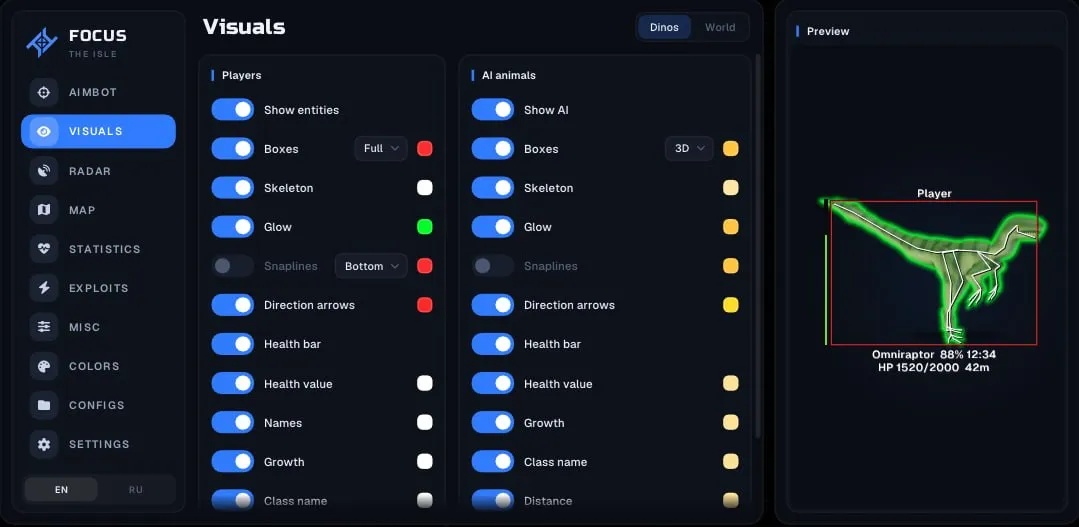
Focus for The Isle separates player and AI animal markers and filters food for your dinosaur’s diet. Map layers connect nearby objects with world zones, while a movable status panel keeps character information together.
Focus for The Isle provides dinosaur ESP and diet-aware map filters for Steam. Players and AI animals have separate visuals, while Only my diet narrows food markers for your dinosaur. A separate navigation view provides a broader overview of zones and nearby objects.
The requirements specify Windows 10 22H2 or Windows 11 25H2, x64, UEFI and GPT, with Intel or AMD processors and any graphics card. These conditions belong to this build rather than every Focus product.
The flight option is labelled infinite stamina for flight. It does not establish unrestricted flight for every dinosaur. A configurable statistics panel collects character conditions, while separate player and AI colours help distinguish the objects shown around you.
Purchase the product to leave a review
Review integrity
Only a confirmed buyer can leave a review
A moderator checks every review before it goes live
Reviews can’t be ordered or deleted
The author can edit it at any time
Share your impressions after the purchase — it helps other players choose.
Frequently Asked Questions
Select a question from the list on the right to see the answer
Focus for The Isle connects dinosaur awareness with food selection and navigation. Separate player and AI controls, diet filters and map layers let you build a view around the current task instead of displaying every available object at once.
Player dinosaur ESP and AI animal ESP have independent toggles and colours. This makes the two groups distinguishable before their names are read. Species, growth, health and distance provide context around a box, while skeletons and model glow add visual detail. The two groups do not need to use the same level of information.
Ignore allies belongs to player visuals. Snaplines from a chosen part of the screen and direction arrows serve another purpose: locating an already displayed target. They need not accompany every label. A separate dinosaur preview gives a reference for appearance before you compare it with the objects in the live scene.
The world section distinguishes corpses, meat, fruit, herbs, mushrooms and water sources. Each category has its own colour, allowing useful objects to stand apart from the rest. Nutrients for the current dinosaur and Only my diet add a diet-based selection rule. Narrowing the set can be more practical than reading every food label in the area.
Nutrient labels can use text or game icons. This changes how information is presented rather than changing the dinosaur's diet. Distance provides context for the marked food. The diet filter also appears on the map, so local markers and a wider map view can follow a similar selection principle without needing identical labels everywhere.
The map includes migration and patrol zones, sanctuaries and spawn areas, alongside roads, caves, water and thermals. These navigation layers can be compared with dinosaurs and food. The minimap can synchronise with the main map; switching synchronisation off allows independent layers. A compact window can therefore stay simpler than the larger overview.
Radar is a separate view of players, allies and AI. Range rings help communicate scale, while the out-of-range option places distant targets at its edge. An edge marker should not be read as a precise position within the selected range. Dot size, text size and the panel itself can be adjusted, along with its location on screen.
The statistics panel brings together health, stamina, hunger, thirst, blood, growth and fractures. Diet information and nearby players or AI can be included before moving the panel away from other widgets. Scale and opacity control its presentation rather than the character values it reports.
Infinite stamina for flight and fracture overrides are listed separately among the additional functions. The flight wording concerns stamina and should not be expanded into unrestricted flight for every dinosaur. Configs save and load the selected arrangement. Check the exact system requirements first, then compare other options in the The Isle catalogue by client support and the navigation layers you need.