
 Discord
 Telegram
Verified buyers only
Only a confirmed buyer can leave a review
 Hell Let Loose: Vietnam
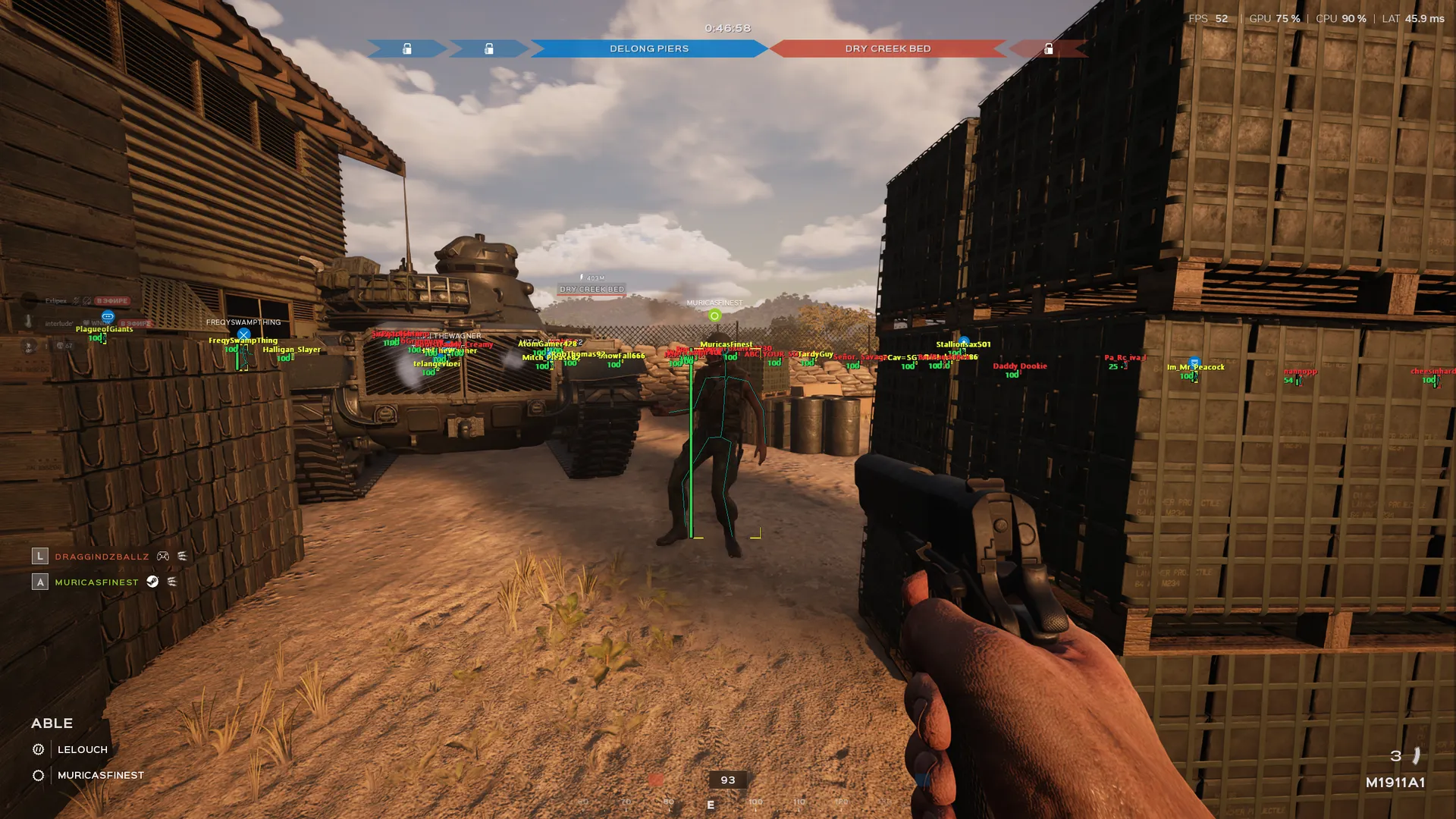
Focus for Hell Let Loose: Vietnam provides player ESP with boxes, skeletons, distance and health. It includes teammate filtering, team colours and saved configurations.
Focus for Hell Let Loose: Vietnam is a player ESP build for Steam. Its filters and display range suit players who want to control which visual information remains on screen. This card is specifically for Vietnam; its requirements should not be applied to a different title in the series.
The setup lists Intel or AMD processors, x64 Windows, GPT partitioning and UEFI mode. Supported builds are named in the requirements. For a different feature combination, compare the Hell Let Loose: Vietnam catalogue. The central tool here is configurable player visibility.
Purchase the product to leave a review
Review integrity
Only a confirmed buyer can leave a review
A moderator checks every review before it goes live
Reviews can’t be ordered or deleted
The author can edit it at any time
Share your impressions after the purchase — it helps other players choose.
Frequently Asked Questions
Select a question from the list on the right to see the answer
Focus for Hell Let Loose: Vietnam provides player ESP with a configurable set of markers. Long sightlines call for a different display from a fight beside cover, which means range and label choices should follow the current position. Player information, team colours and teammate filtering have separate controls rather than being tied to one fixed layout.
Visuals uses Boxes to mark a player's position and Skeleton to show the character's pose. Both can be displayed together, but they occupy different parts of the scene. The box gives an outer reference while the skeleton stays within the silhouette. In a crowded area, begin with the element that is easier to distinguish against the background, then add detail only where it remains useful.
Names identifies a player and Distance supplies a sense of scale. A nearby figure and a distant marker can appear close together on screen, which means the distance label adds context that position alone cannot provide. ESP range has its own control. Reducing it removes distant markers without changing the rest of the visual arrangement, leaving more room around the centre during a local fight.
Health Bar and Health Text offer different ways to read health. The bar supports a quick estimate, while the number provides a specific value. They do not have to remain enabled together: extra text is useful only while it stays readable. Health colour is separate from the box colour so you can keep those signals distinct against a similar background.
Skip Teammates removes allies from ESP, whereas Team Colors changes their appearance. Keep both sides visible if allied positions help with orientation, then separate them by colour. When the goal is to follow enemies alone, the teammate filter removes that extra layer. The team fields in Colors are labelled Axis and Allies; those are the interface labels used to locate the controls.
The general Box colour applies when Team Colors is disabled. This explains why changing that one field may not change the visible team-coloured boxes. Names, distance and skeletons have independent colours too. Before saving a profile, compare the markers against bright ground and dark cover, because the scene behind a colour affects how clearly it can be read.
Home opens the menu and can be reassigned. Menu scale changes the readability of the controls, while the accent changes the interface styling. These are separate from player colours, so adjusting the menu does not require rebuilding the ESP palette. Search provides a direct way to find a known control.
Configs saves a named setup for later loading. Different profiles can hold an open-area view and a shorter-range arrangement for buildings, making it easier to return after experimenting. GPT and UEFI are also listed requirements: they concern disk partitioning and the computer's boot mode. Compare other products through the Hell Let Loose: Vietnam section while keeping each card's requirements separate.