
 Discord
 Telegram
Verified buyers only
Only a confirmed buyer can leave a review
 Diablo IV
Focus for Diablo IV displays enemies, items and points of interest on a map, minimap and radar. It includes skill rotation, navigation and dungeon farming with pickup filters and stop conditions.
Focus for Diablo IV provides maps and dungeon automation for Steam. Routes, skill use and loot collection have separate controls, making it suitable for a setup built around your character rather than one fixed farming routine. Map and visual features can also be used without enabling automated movement.
The requirements list Intel or AMD processors, x64 Windows, GPT partitioning and UEFI boot mode. The stated build range does not identify operating system generations separately. Match the configured action keys to your game bindings before using a route. Other builds are listed in the Diablo IV catalogue.
Purchase the product to leave a review
Review integrity
Only a confirmed buyer can leave a review
A moderator checks every review before it goes live
Reviews can’t be ordered or deleted
The author can edit it at any time
Share your impressions after the purchase — it helps other players choose.
Frequently Asked Questions
Select a question from the list on the right to see the answer
Focus for Diablo IV connects map information with configurable movement and skill use. The map identifies a destination, Navigation controls the route, and Rotation handles the selected skills. Keeping those steps separate matters because travelling, fighting and collecting loot need different conditions. Visual information can remain enabled while you adjust or leave automation disabled.
The full map has point-of-interest filters and separate dungeon categories. Labels and the player marker help relate a destination to your current position, while event timers add timing information. Towns and waypoints can stay visible for route planning. Disable layers that do not serve the current task so you can read a busy area without overlapping labels.
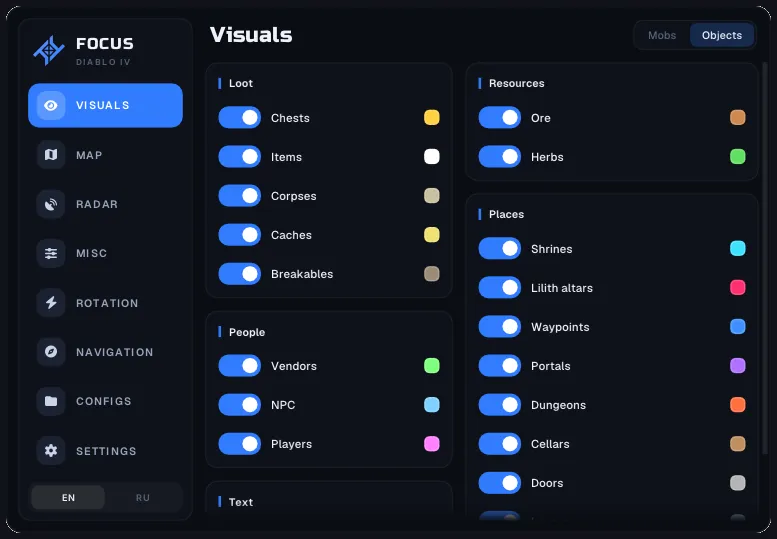
Minimap covers the nearby view with its own size, range and rotation settings. A shorter range reduces the number of distant markers, which makes nearby loot easier to distinguish. Radar has separate colours for enemies, players, NPCs and items. In Visuals, health shows an enemy's condition and distance helps identify whether it belongs to the current encounter. These displays do not require automated movement to be switched on.
Rotation assigns skill keys and a pause between presses. Resource conditions govern spender skills, while health conditions govern defensive skills. This means an action can follow the character's state instead of treating every skill the same way. Enemy distance provides another condition for when the rotation operates. Hold Position uses its own binding, which means it needs to match the control assigned inside the game.
Navigation accepts a destination set by double-clicking the full map. Waypoint spacing and wall margin change the path settings, and showing the path makes the selected direction visible. Avoid Mobs adds an avoidance option. Movement, door interaction and mount controls are configured in the same area so you have the appropriate action key for each part of the route. Check the route first, then add the combat rotation.
Auto Farm separates clearing, objectives and collection. Equipment quality narrows the pickup selection, while materials and gold have a separate toggle. When the purpose of a run changes, review those filters so the collection choices still match it. Chests and resource gathering can be enabled independently. Junk selling and gear repair deal with equipment maintenance between actions.
The Pit settings include tier selection and adaptation based on deaths. The health stop threshold, potion threshold, automatic revival and death-count exit describe different responses, so set them as a coherent sequence. They do not choose a suitable skill setup for you. Dungeon rotation uses locations marked with Ctrl and a click on the map. Recheck the route and pickup choices before starting; the Diablo IV section lets you compare this combination with other available builds.