
 Discord
 Telegram
Verified buyers only
Only a confirmed buyer can leave a review
 Dead by Daylight
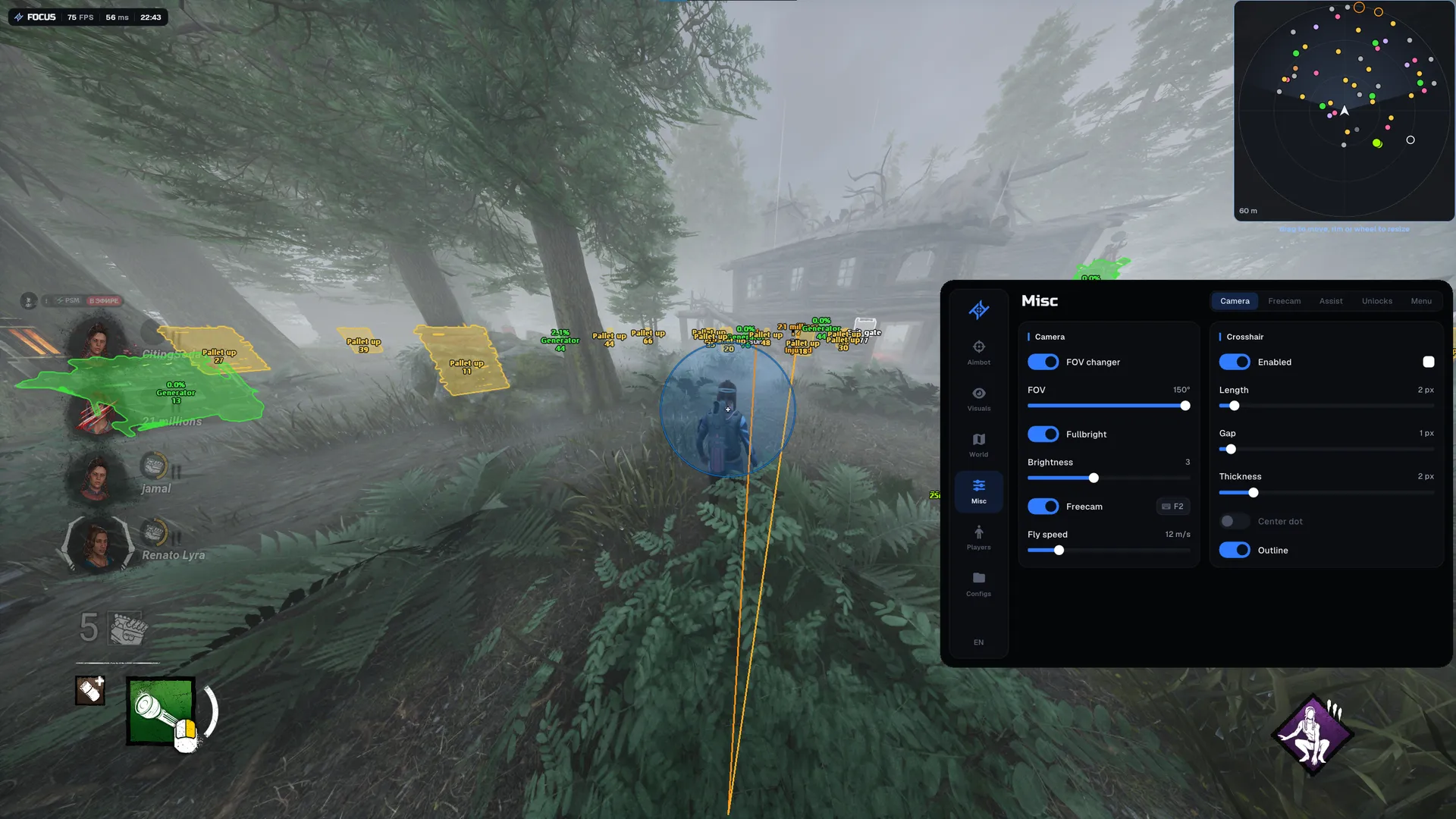
Focus for Dead by Daylight is for Epic Games only. It includes aimbot for both roles, Survivor and Killer ESP, generator progress, radar, freecam, automatic skill checks and unlocks. Prestige and level changes affect local display only.
Focus Dead by Daylight is a cheat for the Epic Games client only.
The listed requirements are Windows 10 22H2 or Windows 11 25H2, x64, GPT and UEFI, with AMD or Intel CPUs. Check the client before choosing a key. Platform details in the player list describe participants in the match and do not expand this build's client support.
Prestige and level changes in Unlocks affect local display only. Keep that limit in mind if character progression is your reason for choosing a tool. Home opens the menu. Other builds have individual requirements in the Dead by Daylight catalogue.
Purchase the product to leave a review
Review integrity
Only a confirmed buyer can leave a review
A moderator checks every review before it goes live
Reviews can’t be ordered or deleted
The author can edit it at any time
Share your impressions after the purchase — it helps other players choose.
Frequently Asked Questions
Select a question from the list on the right to see the answer
Focus Dead by Daylight is an Epic Games cheat with ESP for both roles and world objects.
Player information, world state and camera controls are separate parts of the build. You can configure them according to the question each answers: a Survivor's health, generator progress and camera position are different kinds of information. Client compatibility is the first condition to check, because this product lists Epic Games only.
Survivor and Killer ESP have separate sections. Box, Glow and Skeleton mark the character, while Name and Distance add context to the position on screen. Survivors also have Health state and Wiggle progress. These are useful when a simple player marker is not enough: the labels explain the current situation, and State colors distinguish injured, downed or carried players.
Current action shows what a character is doing. Off-screen arrows preserve a direction indicator when the model is outside the view. If the scene is crowded, separate distance limits can be set for players and objects. The live model preview lets you inspect Box and Glow choices before returning to the game, so changes to their appearance can be evaluated in the menu.
Generators are divided into not started, repairing and completed states. Generator progress can use a percentage and a bar placed above or below the name. That lets you choose a format that remains readable when several objects are marked. Pallets, Hooks and Chests also have state filters, which helps distinguish a standing pallet, an occupied hook or an opened chest.
Radar has separate player and object filters. When players are the priority, unrelated world categories can be hidden; object markers have their own switches for a different layout. Size and Max distance are independent, and the panel can be moved while the menu is open. In practice, choosing the area to monitor does not require keeping the panel in an awkward screen position.
The aimbot depends on your role: a Survivor targets the Killer, while the Killer targets the Survivor nearest the crosshair. Head or Body is selected separately from Hold, Toggle or Always mode. Field of view controls the selection area, while Smoothing and Max speed control movement. Tune those parameters separately, using Draw FOV and Target line to understand the current selection.
FOV changer and Fullbright affect how the scene is presented. Freecam uses WASD movement with separate boost and precision controls. This is useful when inspecting an area from a different camera position, because flight speed and precise movement can be adjusted independently. Crosshair has its own color, thickness and center-dot settings.
Auto skill check offers Great, Good and Random results. Character speed applies to both roles, while No attack cooldown and Wiggle impulse are Killer-only settings. The role label therefore matters: these are not identical abilities for every participant in the match.
Prestige and level in Unlocks change local display only. Cosmetic and perk unlocks are listed separately, and applying unlocks requires returning to the main menu and entering again. A locally displayed level does not mean saved account progression has changed. If that control is the reason for choosing the product, keep its local-only limit in mind alongside the ESP and camera features.
Home opens the menu, with Russian and English interfaces and named configs available. The listed setup is Windows 10 22H2 or Windows 11 25H2, x64, GPT and UEFI, using AMD or Intel CPUs. Other Dead by Daylight cheats have their own requirements, so compare client support and the limits of unlock features separately for each build.