 Discord
 Telegram
Verified buyers only
Only a confirmed buyer can leave a review
 Bodycam
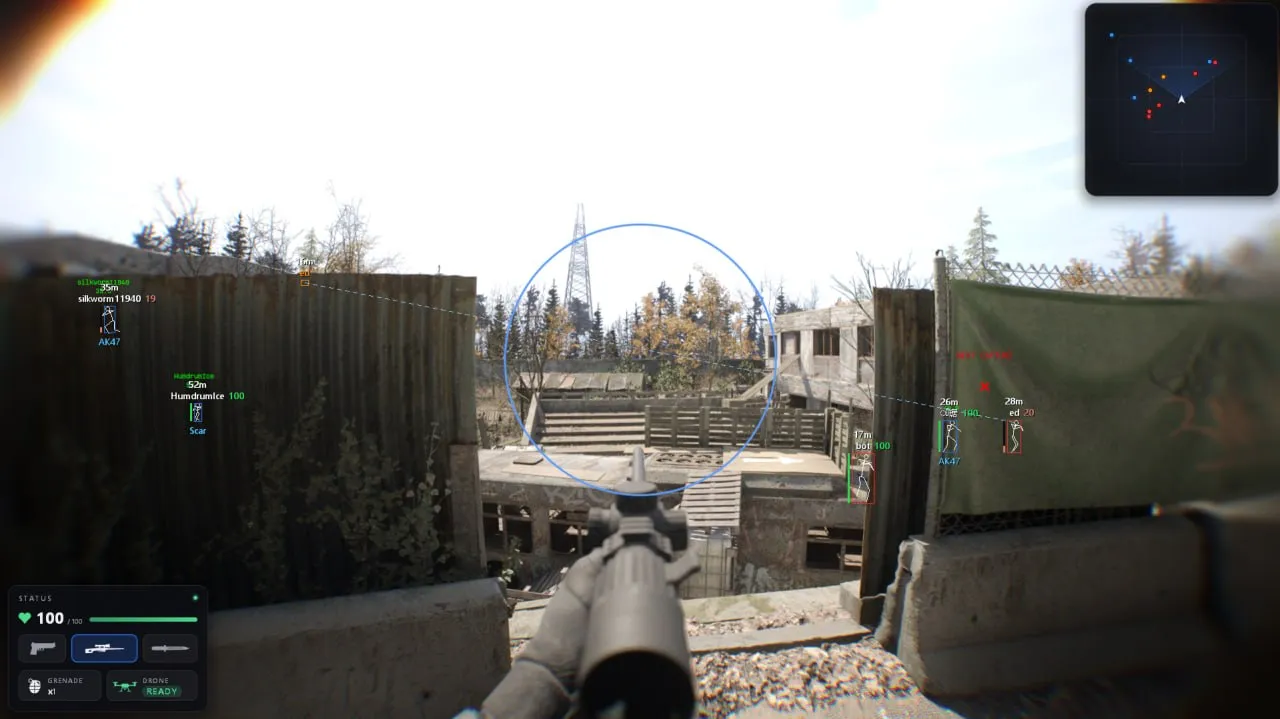
Focus for Bodycam on Steam combines target-selectable aimbot, player and weapon ESP, radar and grenade prediction. Visibility checks, Fullbright, colors and config profiles are adjustable; Streamproof hides the overlay from recordings.
Focus Bodycam is a Steam cheat with adjustable aim and visibility controls.
This build requires Windows 10 22H2 or Windows 11 25H2, x64 architecture, a GPT disk and UEFI firmware mode. AMD and Intel processors are listed, with no specific graphics card brand required. Match the operating system release and game client before choosing a key.
Activation and menu keys can be reassigned. Streamproof hides the overlay from recordings; target selection and visibility checks have their own aim controls. For a different feature mix, compare the individual requirements in the Bodycam catalogue.
Purchase the product to leave a review
Review integrity
Only a confirmed buyer can leave a review
A moderator checks every review before it goes live
Reviews can’t be ordered or deleted
The author can edit it at any time
Share your impressions after the purchase — it helps other players choose.


Frequently Asked Questions
Select a question from the list on the right to see the answer
Focus Bodycam is a Steam cheat with aimbot, ESP and grenade prediction.
Its aim controls, player labels and radar are separate, so you can decide how much information belongs on the screen before adding another panel. Grenade prediction also has its own settings. A trajectory tells you about the path, while bounces and the explosion point help you read the end of a throw.
Target selection chooses between the closest player, the player nearest the crosshair and the one with the lowest health. This matters when several opponents occupy the same view: proximity to your character and proximity to your crosshair are different priorities. Target lock keeps the selected target, and Target line makes that selection visible while you adjust the settings.
FOV size controls the selection area around the crosshair. Draw FOV circle makes the boundary readable, while its fill and thickness change the appearance of that guide. Smoothing changes the movement toward the selected hitbox, so you can tune it alongside Hold, Toggle or Always mode. Skip teammates and Visible targets only filter eligibility before Head, Neck or Chest determines the point to aim at.
Player ESP separates Box, Skeleton and text labels. HP bar position and HP number position can be adjusted independently from the name and distance. That is useful when labels overlap around nearby characters. The ESP character preview lets you inspect their arrangement before returning to the scene. Held weapon and Drones have separate switches, so the information shown can match what you need to track.
Radar range and Radar size solve different problems. Range decides the area represented, while size decides how much screen space the panel occupies. Opacity can make that panel less intrusive, and dragging it with the mouse lets you move it away from another part of the interface. Circle and Square change the panel shape without requiring a different set of player labels.
Trajectory, Bounces and Explosion point are independent grenade controls. If you mainly need the landing area, you can reduce the amount of path detail displayed. Ground weapons have their own category colors, which means a weapon class can be distinguished before reading its label. Their Max distance control is useful for removing faraway markers from an already busy view.
Fullbright changes scene lighting, while Remove vignette addresses the darkening around the edges. These controls serve a different purpose from Text size and ESP colors: adjust the labels themselves when they blend into the background. Streamproof hides the overlay from recordings. Menu key and Panic key are assignable separately, so you can keep those actions on different controls.
Save config, Load last config on startup and Autosave preserve a chosen arrangement. Autosave interval determines how often that automatic save happens. This is handy when you switch between a player-focused layout and a radar-focused one, because the settings do not have to be rebuilt section by section. Check the key assignments and panel positions before saving the version you want to reuse.
The listed operating systems are Windows 10 22H2 and Windows 11 25H2, with x64 architecture, GPT partitioning and UEFI firmware mode. AMD and Intel CPUs are supported, but the processor brand does not replace the other requirements. The Bodycam cheat catalogue contains separate builds whose requirements should be compared individually with your setup.