Discord
 Telegram
Verified buyers only
Only a confirmed buyer can leave a review
 Rust
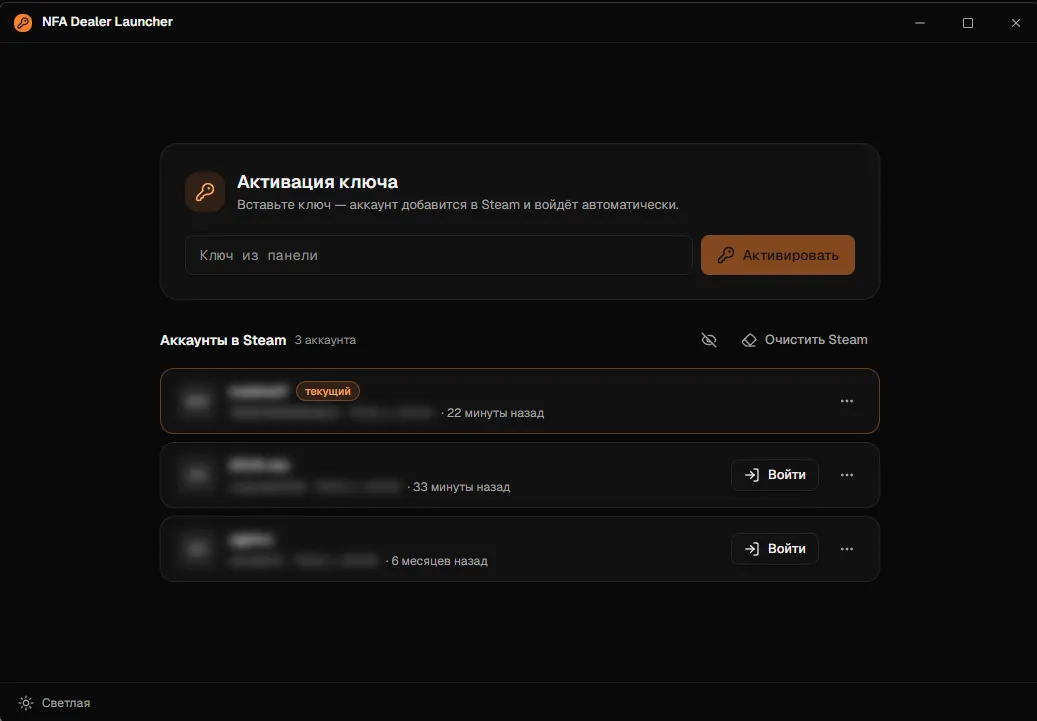
RustA Steam account that already owns Rust, supplied by NFA Dealer. Twenty tariffs cover hours played from 0–250 up to 7000+, owners who have stayed away for 5 or 15+ days, and Premium profiles with paid DLC and skins worth $50 or more. You receive an activation key: paste it into NFA Dealer Launcher and the account is added to Steam and signed in for you, with no password or Steam Guard codes. Signing in requires a Windows PC with Steam installed.
Purchase the product to leave a review
Review integrity
Only a confirmed buyer can leave a review
A moderator checks every review before it goes live
Reviews can’t be ordered or deleted
The author can edit it at any time
Share your impressions after the purchase — it helps other players choose.
Frequently Asked Questions
Select a question from the list on the right to see the answer
NFA Dealer's Rust NFA account is a Steam profile that already owns Rust. Its 20 tariffs differ in three ways — hours played, how long the owner has stayed away, and whether paid DLC and skins come with the profile — and below is what each of them changes, so you can pick by purpose rather than by price.
NFA stands for non-full access. The profile still belongs to its original owner and the email and password never reach you, so you can play, build up hours and join a team, but you cannot change the password, swap the email or add a phone number. If you want a Rust account that becomes entirely yours, that is a different product: the Full Access Account Rust comes with the login, the password and the mailbox.
Sign-in goes through NFA Dealer Launcher. You get a key after the purchase and paste it into the launcher's activation field; the launcher adds the profile to Steam and signs in by itself, which means no password and no Steam Guard codes. Every profile you activate stays in the launcher's list of Steam accounts, with the current one marked and a sign-in button next to each of the others, so switching takes one click. You need a Windows PC with Steam installed.
A Rust account with hours matters wherever a server with a playtime filter or a clan checks the Steam profile before letting a player in, and a fresh profile often falls short. Hours cannot be added after the purchase, which is why the threshold is chosen up front. "0–250 hours" works if you play on servers without a filter and want the cheapest way in. "500–1000 hours" and "1000–2000 hours" clear most clan requirements, while "3000–7000 hours" and "7000+ hours" give you a profile that reads like a veteran's in the player list.
The "Owner inactive, days" line on the account tab tells you how long the owner has been away. The longer the absence, the less likely they are to come back and change the details, which is why these tariffs are the ones for long-term play on a single profile. The chance goes down, it does not disappear — worth keeping in mind if you plan to put months into the account. By the same logic "Inactive 15+ days" gives more headroom than "Inactive 5+ days", and a combination such as "Inactive 15+ days, 1000+ hours" puts long-term play and an hours threshold into one profile.
Premium tariffs carry the "Paid DLC" mark: item packs sold separately from the base game are already bought and usable from your first session. "Premium, $50+ skins" and "Premium, $100+ skins" add an inventory valued at that amount or more. The skins belong to the profile — yours to use in game while you play on it, but not to withdraw or sell, because that takes full access. "Premium, inactive owner" is the only tariff that pairs the DLC with an owner who has stopped signing in.
For a second profile on unfiltered servers, start with "0–250 hours". If a server or a clan asks for playtime, match the number in the tariff name; the same figure appears under "Hours played" on the account tab. Choose an inactive owner for long-term play and Premium if you want the items. The price comes off your GCC balance, and the launcher key arrives after the purchase. Everything else for the game, cheats and other accounts alike, is on the Rust page.