Discord
 Telegram
Verified buyers only
Only a confirmed buyer can leave a review
 Battlefield Series
A Steam account that owns Battlefield 6, from NFA Dealer: the single-player campaign and every multiplayer mode without paying full price for the game. After payment you get a key, and NFA Dealer Launcher adds the account to Steam and signs in on its own, so you need neither the password nor Steam Guard codes. The game needs 64-bit Windows 10 or 11 with TPM 2.0 and Secure Boot enabled, and the Steam version runs through the EA app.
Purchase the product to leave a review
Review integrity
Only a confirmed buyer can leave a review
A moderator checks every review before it goes live
Reviews can’t be ordered or deleted
The author can edit it at any time
Share your impressions after the purchase — it helps other players choose.
Frequently Asked Questions
Select a question from the list on the right to see the answer
This Battlefield 6 account from NFA Dealer is a Steam profile that already owns the game. There is one tariff, and it covers the whole thing — the single-player campaign and the multiplayer modes — without paying full price for a copy of your own. Below: how sign-in works, what your PC must have switched on before you buy, and who this kind of profile suits.
NFA means access without handing the profile over. The email and the password stay with the original owner, so you cannot change them or attach your own phone number. Everything else is yours to use: the campaign, multiplayer matches, weapon and gear progression. Progress lives on the profile and carries over from one session to the next. If you want a Battlefield 6 account that is entirely yours, the only route is your own copy of the game; this card has no full-access option.
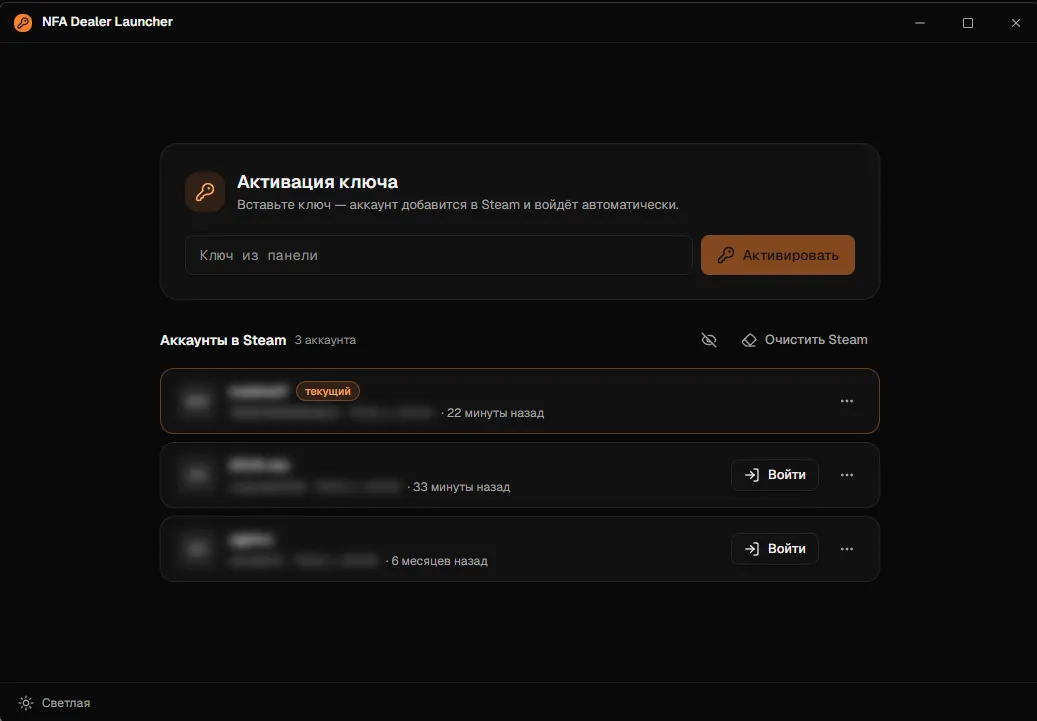
Sign-in runs through NFA Dealer Launcher. You paste the key from your purchase into its activation field, and the launcher adds the profile to Steam and signs in by itself, which means no password and no Steam Guard codes. If your main profile is on the same PC, the launcher's account list lets you switch between the two with a single click.
Battlefield 6 is stricter about the system than most games. It needs 64-bit Windows 10 or 11 with TPM 2.0 and Secure Boot enabled in the motherboard's UEFI settings; without them the game will not start, and no account can change that. A recently built PC most likely has both on already. You can check in advance from Windows itself: the tpm.msc console shows the TPM status, and the System Information window lists the Secure Boot state. A message that Secure Boot is off concerns your PC, not the profile: switch it on in UEFI and relaunch.
One more thing to expect: the Steam version of Battlefield 6 launches through the EA app. Steam offers to install it on first start, and that is a normal part of the launch rather than an error.
Most people take one to try Battlefield 6 without buying the full game; if it clicks, you can get your own copy later. The second case is a separate profile for playing with another squad or under a different name. The third is coming back to the series after a break while you are not yet sure it will stick. If you plan to spend years on one profile and grind ranks, your own copy is the more practical choice: the card has no inactive-owner option, and the tariff says nothing about how often the owner signs in.
The card has one tariff, "Battlefield 6", and its account tab carries a single line, "Game on the account"; it says nothing about hours or how active the owner is. The price comes off your GCC balance, and if the balance is short, the purchase window offers to top up the difference. After the purchase you get the launcher key; then it is activation, installing the game from your Steam library and the first launch through the EA app. Cheats and other products for the series are on the Battlefield Series page.